Tutorial: IDMC Data Trust (needs Informatica IDMC)
All tutorials · Getting started · Deterministic network (Agent Network 2.0, AgentScript) · Technical · IDMC
A deterministic flow over four Informatica shared MCP servers: classify the request, then verify the address, search the catalog with data quality scores, or resolve the customer in MDM. Needs your own Informatica IDMC org and an IDMC MCP client (OAuth 2.0 client credentials).
| Agents | MCP servers | A2A | Policies | Template id |
|---|---|---|---|---|
| 0 | 4 | 0 | v2-idmc-data-trust |
There are three ways to use this template:
- Just use it: create the project, deploy it and chat with it in about 10 minutes.
- Learn step by step: the same steps, with what each part of the network does and how Octoloom shows it.
- Build it from scratch: start from a blank project and build the same network yourself, no code, one screenshot per step.
Before you start
- VS Code with Octoloom for Agent Fabric installed (Marketplace), version 0.9.25 or later.
- An Anypoint organization with Agent Fabric, a connected app (client ID and secret), an environment and a Flex gateway.
- An OpenAI API key (or an OpenAI-compatible LLM gateway).
- An Informatica IDMC org with the four shared MCP services and an IDMC MCP client (see the template README, IDMC setup).
- Nothing else: the IDMC MCP servers are called with OAuth 2.0 client credentials.
Path 1: Just use it
- Home → Start → New Deterministic Network. In the dialog pick Technical, then the card IDMC Data Trust (needs Informatica IDMC). Choose a folder and click Create.
- Deploy. Check the pod in the four URL variables and
idmc.tokenUrl. In Projects & Deploy, click Deploy on this project (or Build & Deploy in the editor) and pick your gateway. Octoloom asks for each secret variable; nothing you type is stored: openai.apiKey: OpenAI API key (secret, injected at deploy time)idmc.clientId: IDMC MCP client: Client ID (OAuth 2.0 client credentials)idmc.clientSecret: IDMC MCP client: Client Secret- Chat. When the status light is green, click Open chat and paste:
Verify and standardize the address 2100 Seaport Blvd, Redwood City, CA 94063, USAWhich catalog assets hold customer data, and what is their data quality score?Check the address 2100 Seaport Blvd, Redwood City, CA 94063 and tell me which catalog assets hold customer address or contact dataFind the customer John Smith, address 2100 Seaport Blvd, Redwood City, CA 94063
Done. The rest of this page explains what you just ran.
Path 2: Learn step by step
Step 1. Connect Octoloom
Open Setup & Connect (Octoloom side bar) and connect Agent Fabric: the connected app client ID and secret and the organization. Pick the environment. Also connect IDMC (Headless IDMC) if you want the IDMC palette tab. The Tooling list shows Node.js, Java and anypoint-cli-v4 with its agent-network plugin. Use Install or Repair on any red row.
Step 2. Create the project from the template
On Home, click New Deterministic Network. In 2 Start from, choose Technical and click IDMC Data Trust (needs Informatica IDMC). The right side shows the template README: what it contains, Deploy in 3 steps and Try it. Keep the suggested name idmc-data-trust or type your own, pick the folder and click Create.
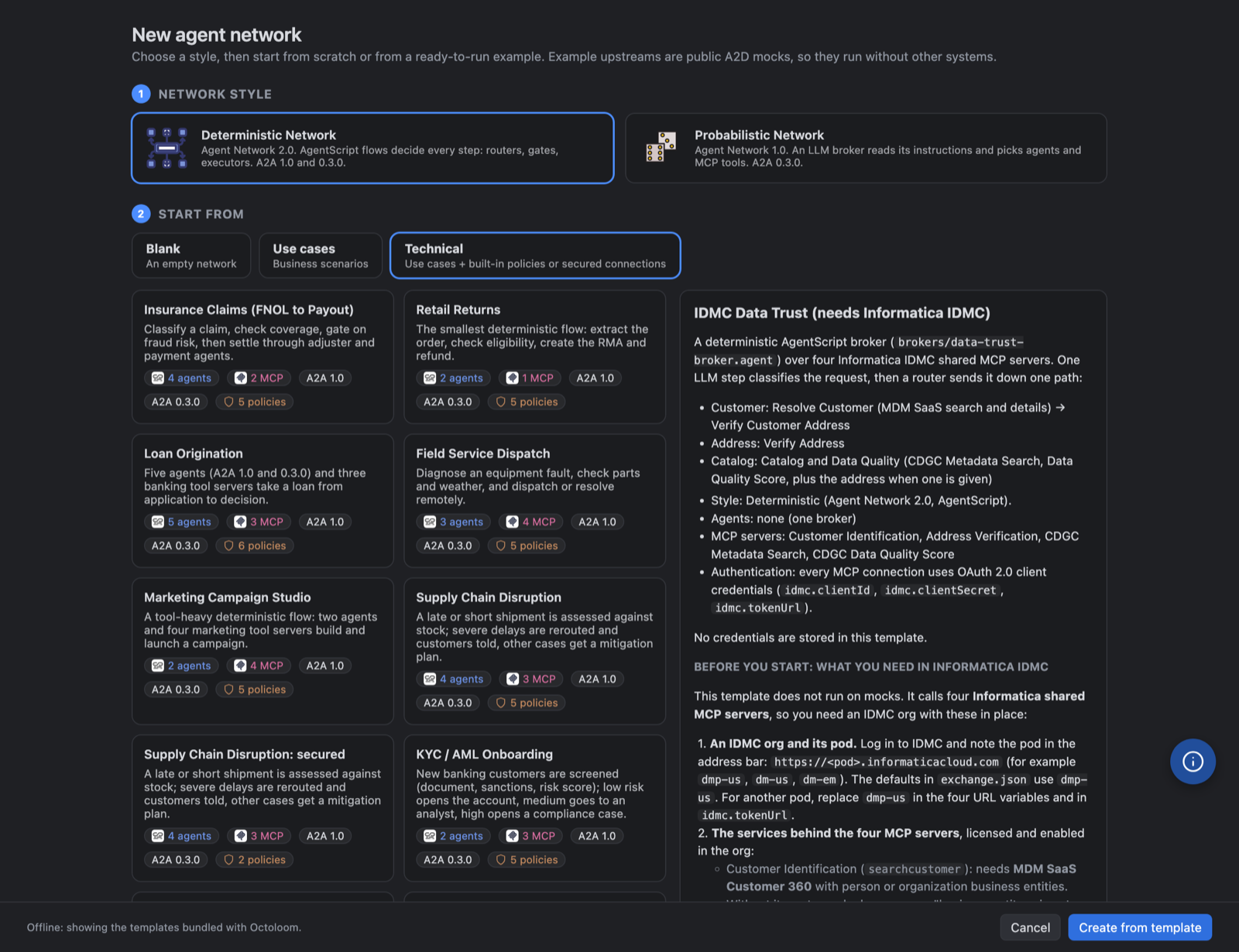
Octoloom writes agent-network.yaml, exchange.json, README.md and the broker flow in brokers/, and opens the canvas. Every id gets the template prefix octo_iv2_, so several templates can be deployed into one org side by side.
Step 3. Read the network on the canvas
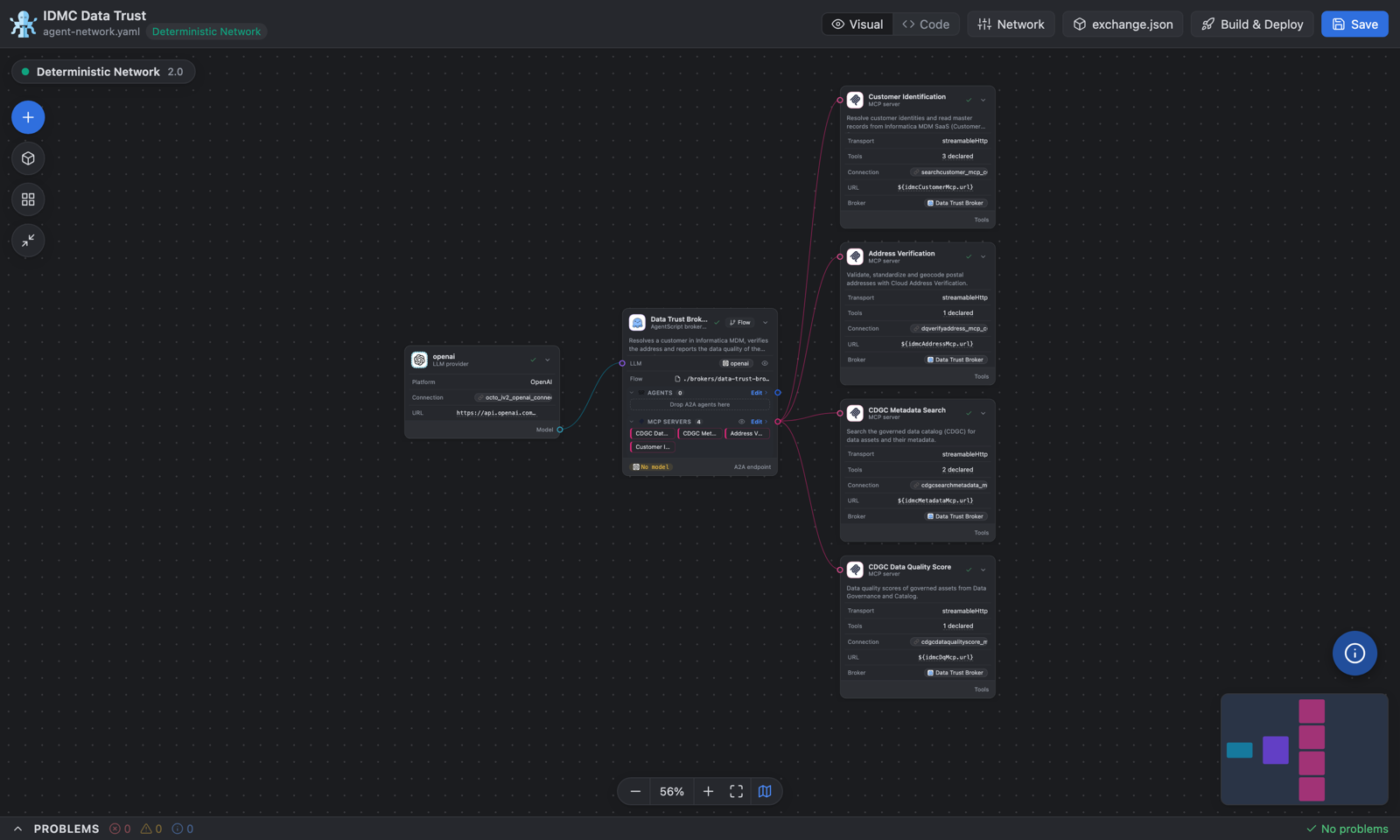
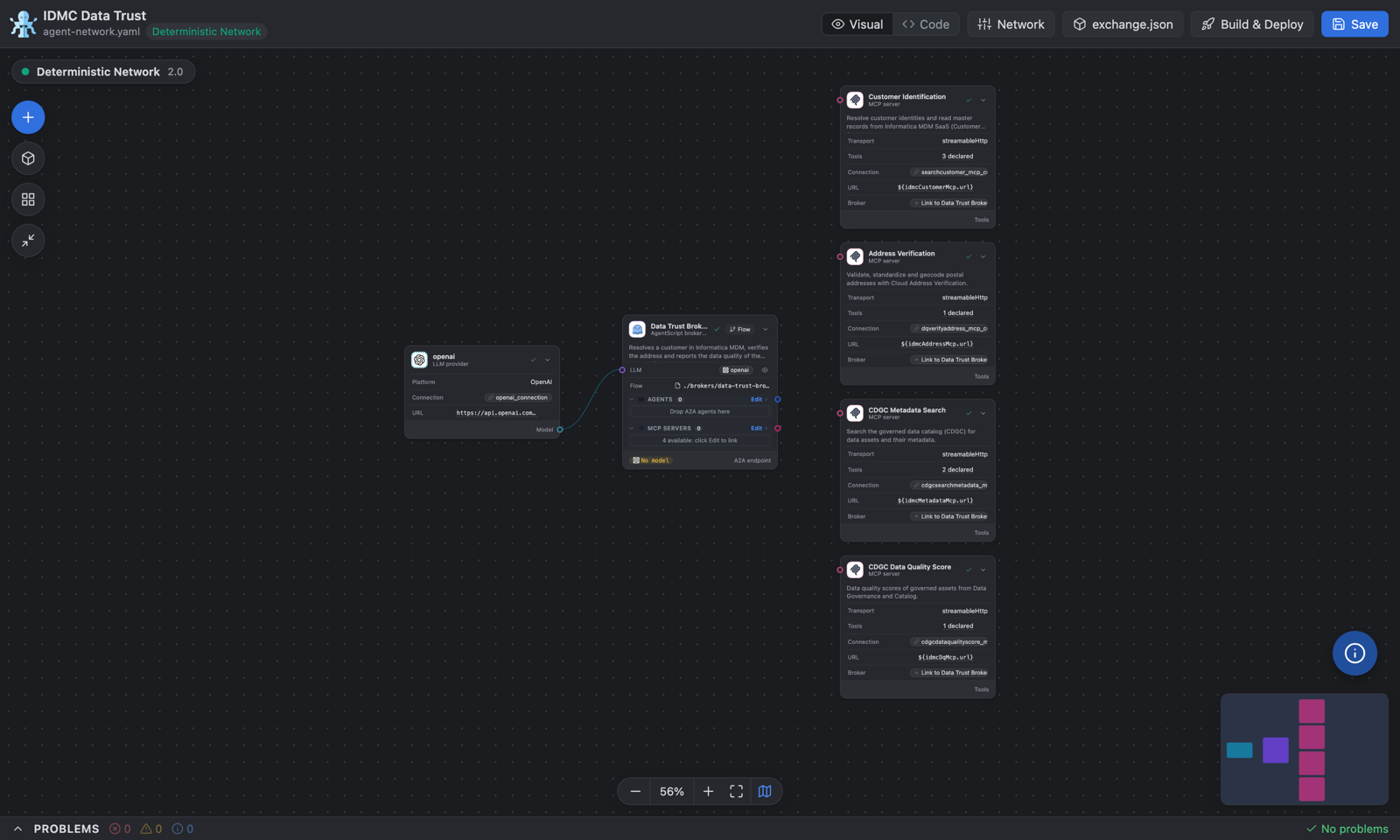
Each card is a part of agent-network.yaml. Click one to open it in the inspector on the right. Each change in the inspector is a change to the text, so the YAML stays the source of truth (Code view shows it).
- Broker Data Trust Broker (
octo_iv2_data_trust_broker): its AgentScript flow decides every step. - MCP server Customer Identification: Resolve customer identities and read master records from Informatica MDM SaaS (Customer 360). Tools:
get_master_record_details,get_related_records,search_master_record. - MCP server Address Verification: Validate, standardize and geocode postal addresses with Cloud Address Verification. Tools:
verify_address. - MCP server CDGC Metadata Search: Search the governed data catalog (CDGC) for data assets and their metadata. Tools:
get_asset_details,search_metadata. - MCP server CDGC Data Quality Score: Data quality scores of governed assets from Data Governance and Catalog. Tools:
get_asset_score.
Try this on the canvas: use the zoom bar and the minimap, drag a card, or Auto layout. The layout is saved per file. Minimize all turns the cards into icon tiles. Click a connection line to see which broker uses which agent or tool.
Step 4. Follow the broker flow (AgentScript)
Double-click the broker card (or open brokers/data-trust-broker.agent). The flow editor shows the AgentScript program that decides every step. The LLM only extracts fields and writes text, so the same input always takes the same branch.
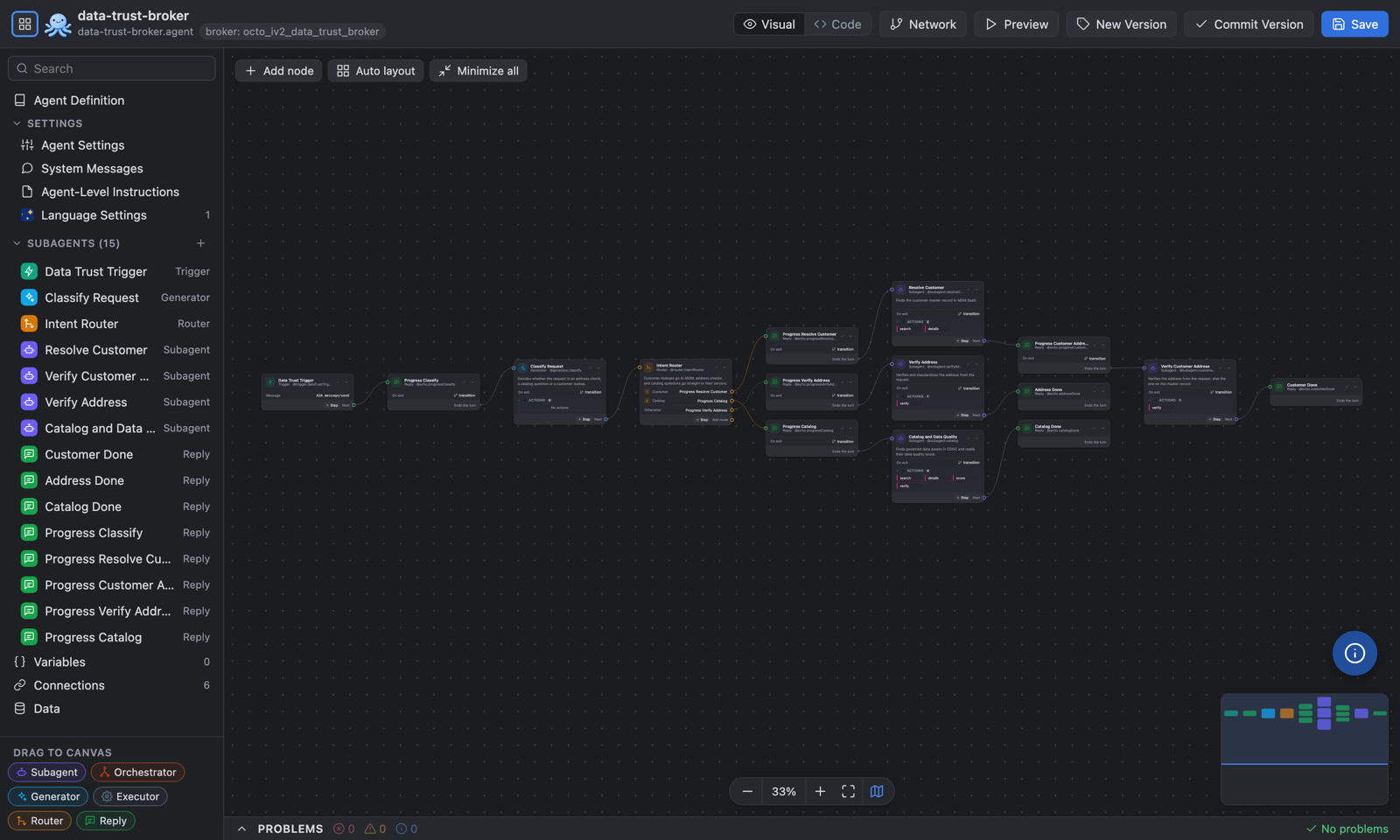
| Step | Kind | What it does |
|---|---|---|
dataTrustTrigger |
Trigger | Starts the flow when an A2A message arrives at the broker. |
classify |
Generator | Decides whether the request is an address check, a catalog question or a customer lookup. |
intentRouter |
Router | Customer lookups go to MDM; address checks and catalog questions go straight to their servers. |
resolveCustomer |
Subagent | Finds the customer master record in MDM SaaS. |
customerAddress |
Subagent | Verifies the address from the request, else the one on the master record. |
verifyAddress |
Subagent | Verifies and standardizes the address from the request. |
catalog |
Subagent | Finds governed data assets in CDGC and reads their data quality score. |
customerDone |
Echo | Ends the flow with the customerDone reply. |
addressDone |
Echo | Ends the flow with the addressDone reply. |
catalogDone |
Echo | Ends the flow with the catalogDone reply. |
progressClassify |
Echo | Progress update (TASK_STATE_WORKING): tells the caller what comes next, then goes on to that step. With Live on, the chat shows it while the broker works. |
progressResolveCustomer |
Echo | Progress update (TASK_STATE_WORKING): tells the caller what comes next, then goes on to that step. With Live on, the chat shows it while the broker works. |
progressCustomerAddress |
Echo | Progress update (TASK_STATE_WORKING): tells the caller what comes next, then goes on to that step. With Live on, the chat shows it while the broker works. |
progressVerifyAddress |
Echo | Progress update (TASK_STATE_WORKING): tells the caller what comes next, then goes on to that step. With Live on, the chat shows it while the broker works. |
progressCatalog |
Echo | Progress update (TASK_STATE_WORKING): tells the caller what comes next, then goes on to that step. With Live on, the chat shows it while the broker works. |
Click a step to edit it in the inspector. + Step adds a node, and + Step → Patterns inserts whole shapes such as retry, human in the loop or a guardrail check. Code shows the .agent text with completion.
Step 5. Validate and build
In the canvas toolbar, open the CLI menu: Validate does a dry run of build, publish and deploy and lists problems in the Problems panel (click one to jump to the card). Build repairs and packages the project locally with anypoint-cli-v4.
The variables of this template (in exchange.json, open it for the no-code form):
| Variable | What | Default |
|---|---|---|
idmc.tokenUrl |
IDMC MCP client: Token URL | https://dmp-us.informaticacloud.com/authz-service/oauth/token |
idmcCustomerMcp.url |
Customer Identification (Informatica shared MCP server, pod dmp-us) full server URL (the gateway forwards to it as is) | https://mcp.dmp-us.informaticacloud.com/mcp-servers/public/searchcustomer |
idmcAddressMcp.url |
Address Verification (Informatica shared MCP server, pod dmp-us) full server URL (the gateway forwards to it as is) | https://mcp.dmp-us.informaticacloud.com/mcp-servers/public/dqverifyaddress |
idmcMetadataMcp.url |
CDGC Metadata Search (Informatica shared MCP server, pod dmp-us) full server URL (the gateway forwards to it as is) | https://mcp.dmp-us.informaticacloud.com/mcp-servers/public/cdgcsearchmetadata |
idmcDqMcp.url |
CDGC Data Quality Score (Informatica shared MCP server, pod dmp-us) full server URL (the gateway forwards to it as is) | https://mcp.dmp-us.informaticacloud.com/mcp-servers/public/cdgcdataqualityscore |
Step 6. Deploy
Open Projects & Deploy and click Deploy on the project (or Deploy… on the canvas). Pick your gateway (the chips show its status and space), keep Tracing, Wait until the network is ready and Publish before deploy on, then enter the secrets. Nothing you type is stored:
openai.apiKey: OpenAI API key (secret, injected at deploy time)idmc.clientId: IDMC MCP client: Client ID (OAuth 2.0 client credentials)idmc.clientSecret: IDMC MCP client: Client Secret
The square status light goes from blue (deploying) to green (Deployed and running). The deployment box lists every broker URL; click one to copy it.
Step 7. Chat with the broker
Click Open chat on the deployment box. On the left is the network (the cards light up as they are called), and on the right is the conversation with its task states. Paste the prompts one at a time:
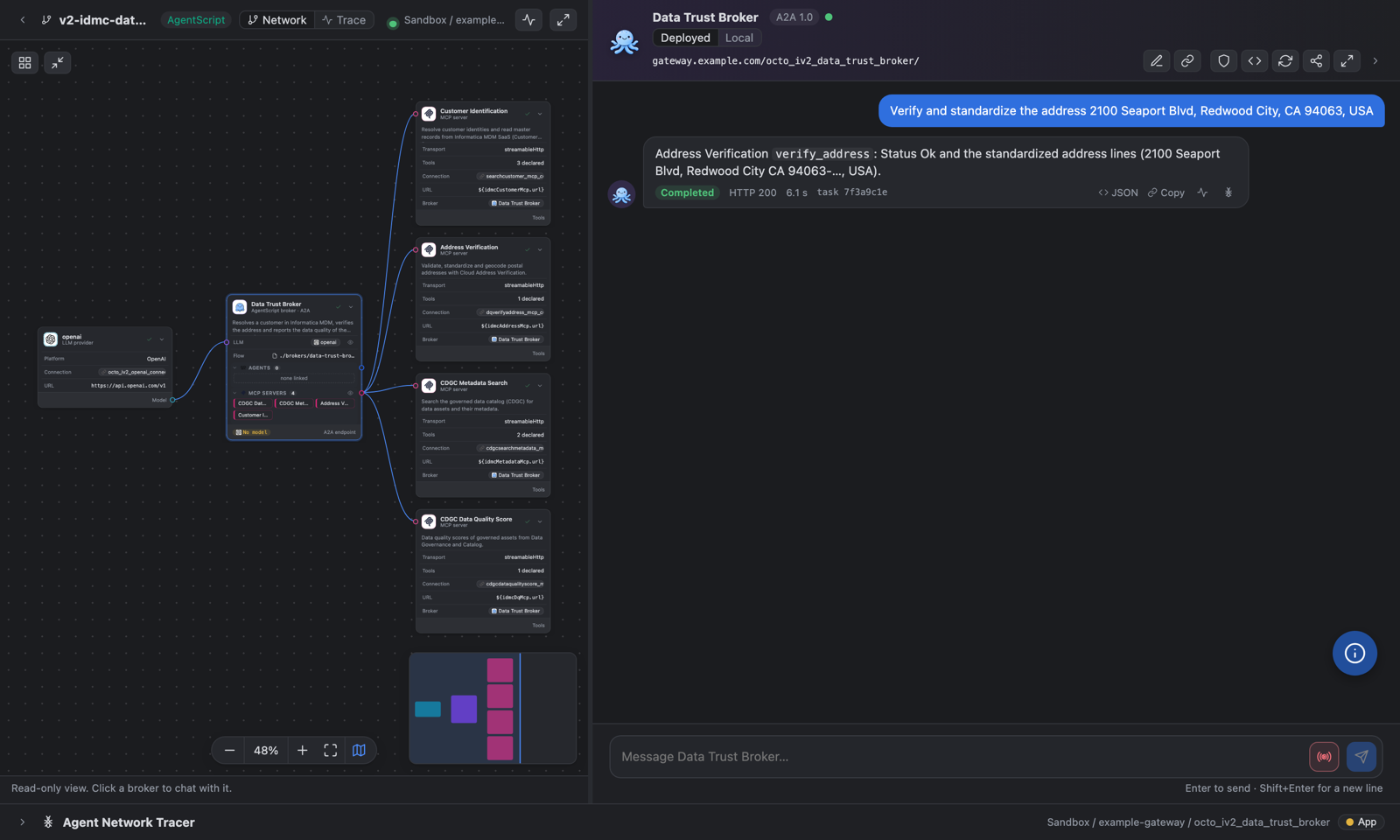
The reply in the screenshot is an illustration: it shows what the broker answers. The real wording changes from run to run.
| Prompt | You should see |
|---|---|
Verify and standardize the address 2100 Seaport Blvd, Redwood City, CA 94063, USA |
Address Verification verify_address: Status Ok and the standardized address lines (2100 Seaport Blvd, Redwood City CA 94063-…, USA). |
Which catalog assets hold customer data, and what is their data quality score? |
CDGC Metadata Search search_metadata: a list of catalog hits (data collections, classifications, protections, fields) with name and type, then CDGC Data Quality Score get_asset_score: the score of the most relevant asset, or that no score is recorded. |
Check the address 2100 Seaport Blvd, Redwood City, CA 94063 and tell me which catalog assets hold customer address or contact data |
verify_address with Status Ok first, then the catalog hits for customer address and contact data from search_metadata. |
Find the customer John Smith, address 2100 Seaport Blvd, Redwood City, CA 94063 |
Customer Identification search_master_record: the master record (business ID, name, address) when MDM SaaS Customer 360 is in place; without it, one sentence with the MDM error ("business entity … is not valid"), then the address check. |
Step 8. Trace a reply
Under each reply, the Tracer icon opens the task in the Agent Network Tracer: a waterfall of every call the broker made (gateway, broker, LLM, A2A agents, MCP tools) on one time axis, coloured like the cards. Errors are red. Click a span to see its request and response. The Network view shows the same reply as a sequence of calls.
Step 9. Share it (optional)
The Share icon in the chat header opens the Share dialog. A²D sessions invites people by email to chat with this deployed broker and brings their passed / failed marks and comments back. Local portal generates a small web chat you can run or host anywhere.
Path 3: Build it from scratch
Here you build the same network yourself, starting from a blank project. Every step uses a form, a menu or a button. You never import the template, and you never type YAML or AgentScript. The names below are the template's names without the octo_iv2_ prefix. You can use your own names, but keep them consistent.
The text fields take plain values. Where a value looks like
${group.name}, type it as shown: it is a variable thatexchange.jsondeclares and that deploy fills in.
Step 3.1. Create a blank project with a starter broker
Connect Octoloom first, as in Path 2, Step 1. Then, on Home, click New Deterministic Network. In 2 Start from, choose Blank and turn on Add a starter broker.
- Broker name:
Data Trust Broker - Name:
idmc-data-trust-scratch(the Exchange asset id; a different name from the template, so both can live in one org) - Parent folder: pick a folder, then click Create blank project.
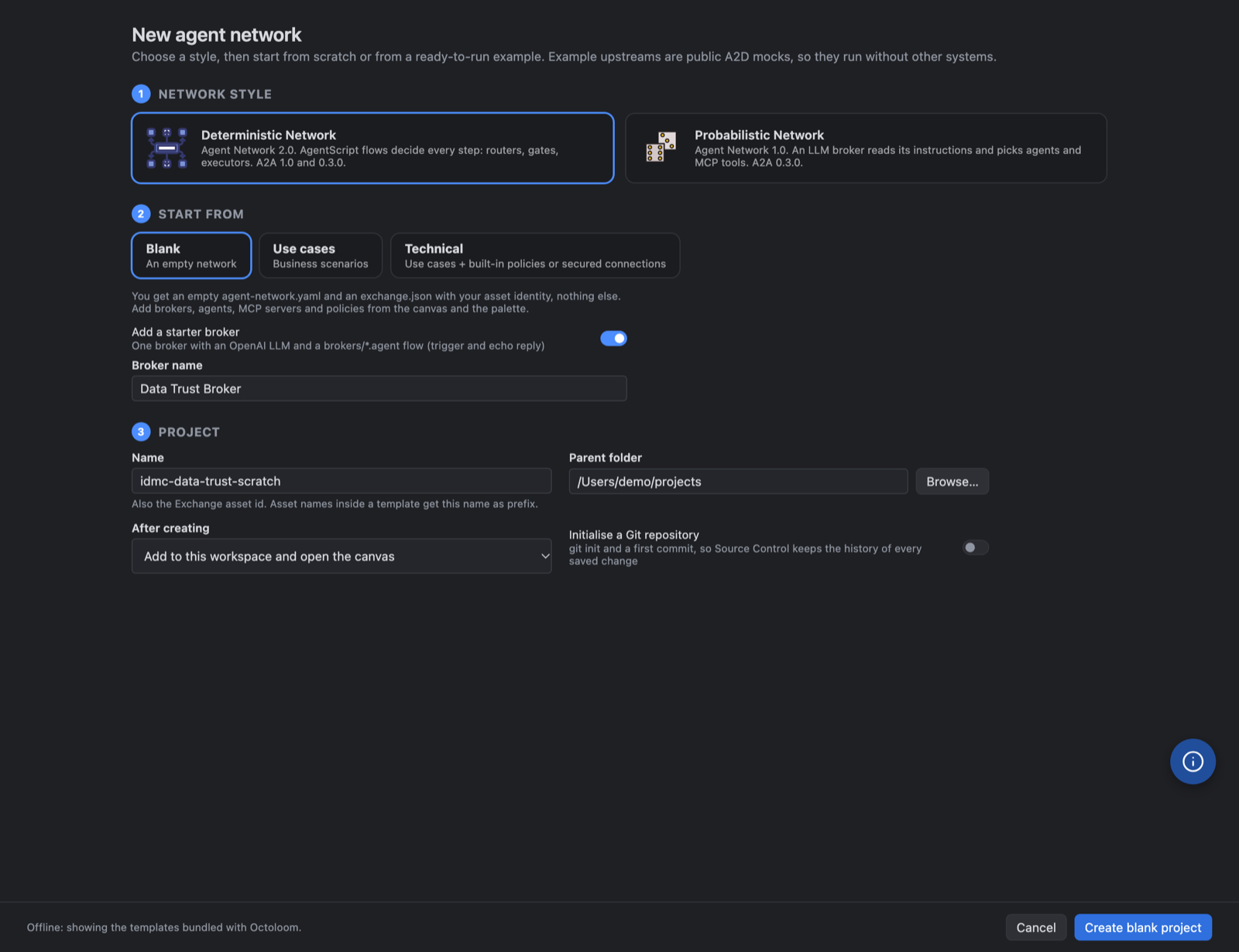
The starter broker data_trust_broker has an OpenAI LLM connection (openai_connection, MuleSoft's published OpenAI LLM) and a flow brokers/data-trust-broker.agent with a trigger, one subagent and the built-in done reply. The LLM is already done.
Step 3.2. Add the MCP servers
Click + → MCP server → Empty, then fill in:
- Customer Identification: Key
searchcustomer_mcp, Label Customer Identification, Description Resolve customer identities and read master records from Informatica MDM SaaS (Customer 360) · Protocol version2025-06-18. The transport is already Streamable HTTP on/mcp. - Address Verification: Key
dqverifyaddress_mcp, Label Address Verification, Description Validate, standardize and geocode postal addresses with Cloud Address Verification · Protocol version2025-06-18. The transport is already Streamable HTTP on/mcp. - CDGC Metadata Search: Key
cdgcsearchmetadata_mcp, Label CDGC Metadata Search, Description Search the governed data catalog (CDGC) for data assets and their metadata · Protocol version2025-06-18. The transport is already Streamable HTTP on/mcp. - CDGC Data Quality Score: Key
cdgcdataqualityscore_mcp, Label CDGC Data Quality Score, Description Data quality scores of governed assets from Data Governance and Catalog · Protocol version2025-06-18. The transport is already Streamable HTTP on/mcp.
Step 3.3. Add the connections
A connection is the URL (and authentication) Agent Fabric uses to reach an agent or an MCP server. Click + → Connection → Empty once per MCP server, and fill in:
| Key | Kind | Registry entry → Name | URL |
|---|---|---|---|
searchcustomer_mcp_connection |
mcp |
searchcustomer_mcp |
${idmcCustomerMcp.url} |
dqverifyaddress_mcp_connection |
mcp |
dqverifyaddress_mcp |
${idmcAddressMcp.url} |
cdgcsearchmetadata_mcp_connection |
mcp |
cdgcsearchmetadata_mcp |
${idmcMetadataMcp.url} |
cdgcdataqualityscore_mcp_connection |
mcp |
cdgcdataqualityscore_mcp |
${idmcDqMcp.url} |
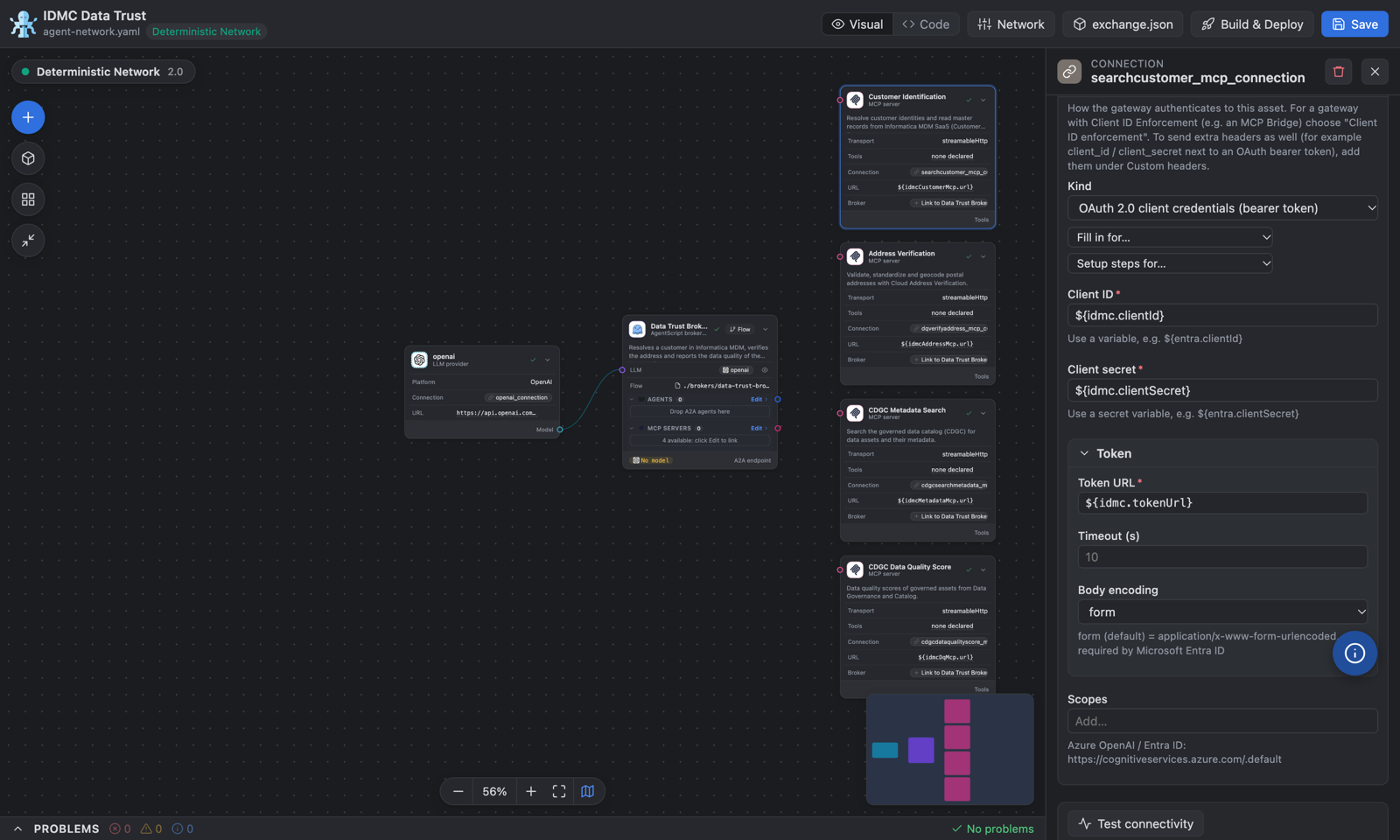
These connections also authenticate. In Authentication, pick the kind and type the values exactly as shown. The values are variables, and the secret ones are asked for at deploy time:
searchcustomer_mcp_connection: OAuth 2.0 client credentials (bearer token), clientId${idmc.clientId}, clientSecret${idmc.clientSecret}, Token → Token URL${idmc.tokenUrl}, Body encodingformdqverifyaddress_mcp_connection: OAuth 2.0 client credentials (bearer token), clientId${idmc.clientId}, clientSecret${idmc.clientSecret}, Token → Token URL${idmc.tokenUrl}, Body encodingformcdgcsearchmetadata_mcp_connection: OAuth 2.0 client credentials (bearer token), clientId${idmc.clientId}, clientSecret${idmc.clientSecret}, Token → Token URL${idmc.tokenUrl}, Body encodingformcdgcdataqualityscore_mcp_connection: OAuth 2.0 client credentials (bearer token), clientId${idmc.clientId}, clientSecret${idmc.clientSecret}, Token → Token URL${idmc.tokenUrl}, Body encodingform
Step 3.4. Declare the variables
The Problems bar now shows Variable ${…} is not declared in exchange.json for each new variable. Click Add to exchange.json on each one.
Then open exchange.json (it opens as a form) and, under Variables, set the defaults:
| Variable | Default |
|---|---|
idmc.tokenUrl |
https://dmp-us.informaticacloud.com/authz-service/oauth/token |
idmcCustomerMcp.url |
https://mcp.dmp-us.informaticacloud.com/mcp-servers/public/searchcustomer |
idmcAddressMcp.url |
https://mcp.dmp-us.informaticacloud.com/mcp-servers/public/dqverifyaddress |
idmcMetadataMcp.url |
https://mcp.dmp-us.informaticacloud.com/mcp-servers/public/cdgcsearchmetadata |
idmcDqMcp.url |
https://mcp.dmp-us.informaticacloud.com/mcp-servers/public/cdgcdataqualityscore |
Leave the secret variables (openai.apiKey, idmc.clientId, idmc.clientSecret) empty: deploy asks for them and never stores them.
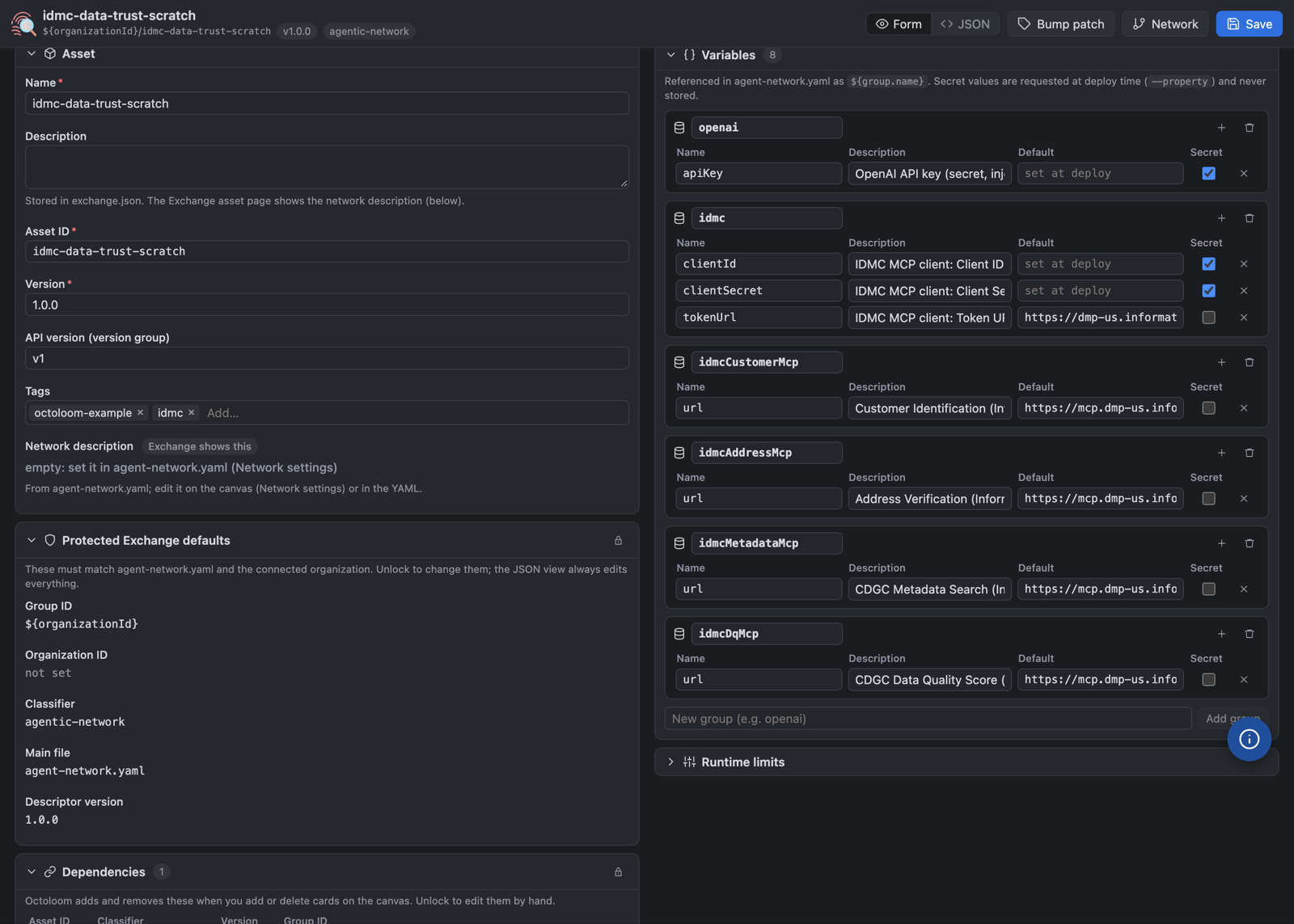
Also click Remove it on any declared but not used variable that the Problems bar shows.
Step 3.5. Declare the MCP tools
On each MCP server card, click the Tools row (or its pencil). Octoloom reads the tool list from the running server: tick the tools below. You can also type a name in Add a tool by name….
- Customer Identification:
get_master_record_details,get_related_records,search_master_record - Address Verification:
verify_address - CDGC Metadata Search:
get_asset_details,search_metadata - CDGC Data Quality Score:
get_asset_score
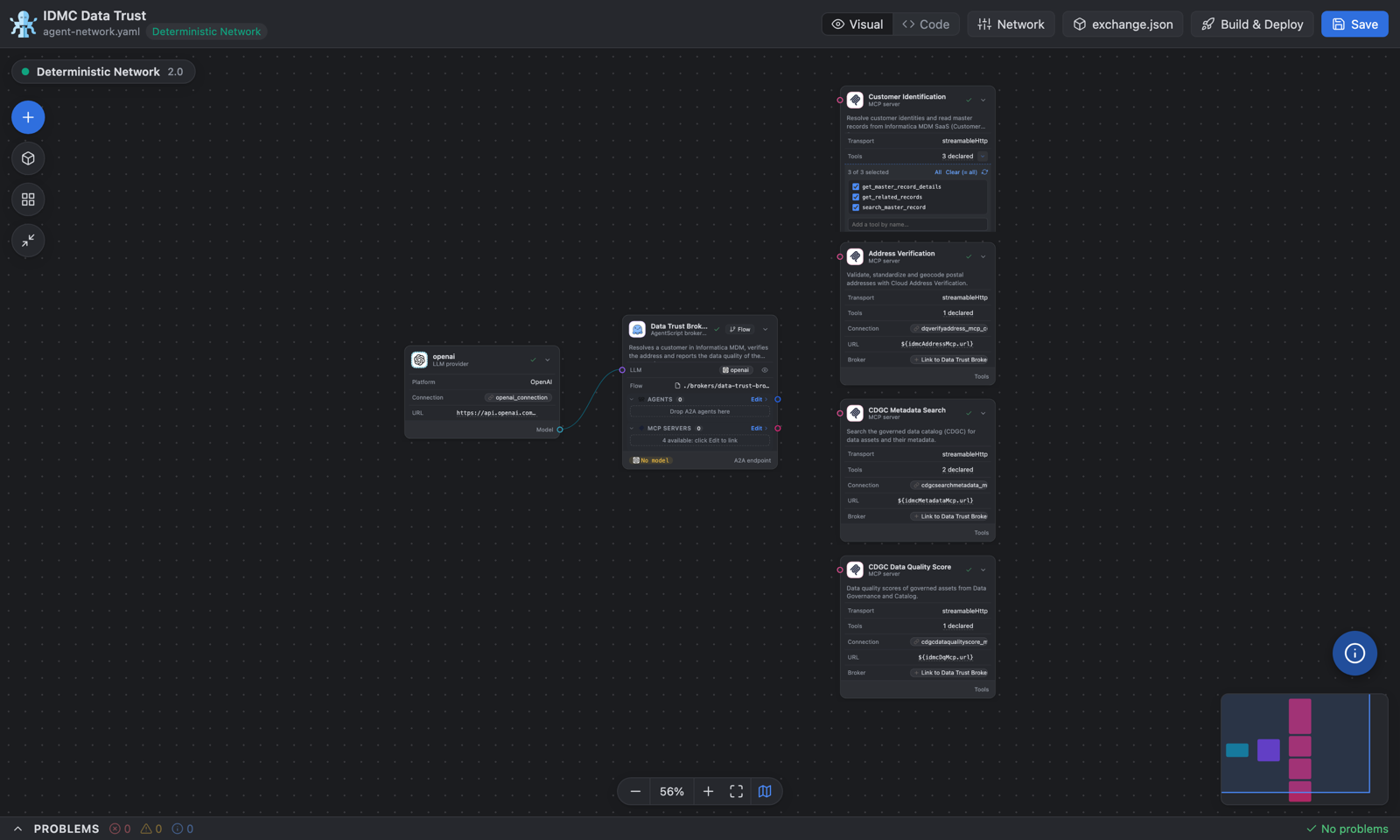
Step 3.6. Link the MCP servers to the broker
Every MCP card now has a Broker row with Link to Data Trust Broker. Click it on each card. Octoloom adds the matching actions to the broker flow: one per declared MCP tool.
Step 3.7. Build the broker flow
On the broker card (or in its inspector), click Open broker flow. Then set up the flow:
- Settings → Language Settings: on the
defaultmodel, set Reasoning effort (OpenAI) toMINIMAL. - Settings → System Messages: set the instructions to: You are a customer data steward. Use only data the Informatica MCP servers return. When a tool fails or returns nothing, say so in one sentence and continue with the other steps; never ask the user to choose a business entity.
- Select the
assistantsubagent and delete it (trash icon). The trigger and the built-indonereply stay. - Add the steps below in order. Select the step that comes before, click Add node, pick the kind and choose Empty, then set its API name in General. Octoloom wires each new step after the selected one, and you set the exact next step in the inspector.
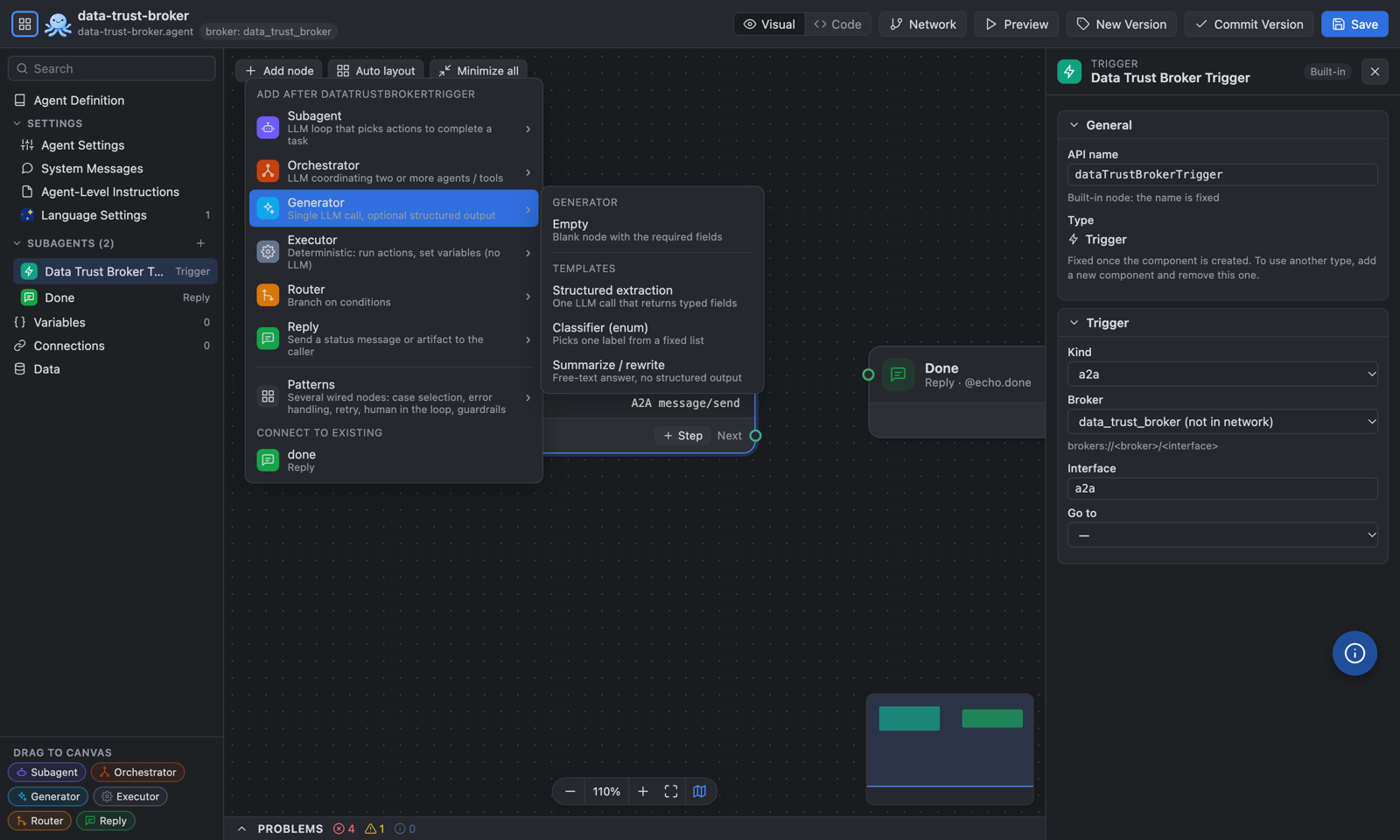
Select the trigger and, under Go to, pick progressClassify once that step exists.
Generator classify
- Label Classify Request · Description Decides whether the request is an address check, a catalog question or a customer lookup.
- System instructions:
Classify the message. intent = "address" when it only asks to verify or standardize a postal address, "catalog" when it asks about data assets, catalog, classifications, protections or data quality (with or without an address), "customer" when it names a person or company to look up. Extract the postal address on one line, or "NONE". Extract the customer name, or "NONE". catalogQuery = two or three keywords for the catalog search (for example "customer address"), or "NONE".
- Prompt:
{!@request.payload.message.parts[0].text}
- Structured output (Add field for each):
intent(string): What the request needs · Allowed valuesaddress,catalog,customeraddress(string): Postal address on one line, or NONEcustomer(string): Customer name, or NONEcatalogQuery(string): Keywords for the catalog search, or NONE- Next step (on exit) → Go to:
intentRouter
Router intentRouter
- Description Customer lookups go to MDM; address checks and catalog questions go straight to their servers.
- Routes (+): Label Customer · When
@generator.classify.output.intent == "customer"· Go toprogressResolveCustomer - Routes (+): Label Catalog · When
@generator.classify.output.intent == "catalog"· Go toprogressCatalog - Otherwise → Go to:
progressVerifyAddress
Subagent resolveCustomer
- Label Resolve Customer · Description Finds the customer master record in MDM SaaS.
- Reasoning instructions:
Find the master record of: {!@generator.classify.output.customer}. Call search_master_record once with entityType "c360.person" (or "c360.organization" for a company), recordsToReturn 5 and the name in search; do not pass fields. When a match is found, call get_master_record_details with its id and entityType. When the call fails (for example "business entity is not valid"), stop and report the error in one sentence.
- Actions (+ Add action…):
search_master_record,get_master_record_details - Limits → Max loops:
6 - Structured output (Add field for each):
summary(string): Business ID, name and address of the master record, or the error- Next step (on exit) → Go to:
progressCustomerAddress
Subagent customerAddress
- Label Verify Customer Address · Description Verifies the address from the request, else the one on the master record.
- Reasoning instructions:
Address from the request: {!@generator.classify.output.address}. Master record: {!@subagent.resolveCustomer.output.summary}. Use the request address, else the master record address; when there is none, say so. Call verify_address once with Request {IO:{Inputs:[{AddressElements:{Country:"USA",Locality:[{Value:
}],PostalCode:[{Value: }],AdministrativeDivision:[{Value: }]},PreformattedData:{PostalDeliveryAddressLines:[ ]}}]}}. Report Status and the standardized address.
- Actions (+ Add action…):
verify_address - Limits → Max loops:
5 - Next step (on exit) → Go to:
customerDone
Subagent verifyAddress
- Label Verify Address · Description Verifies and standardizes the address from the request.
- Reasoning instructions:
Address: {!@generator.classify.output.address}. When it is NONE, say that no address was given. Otherwise call verify_address once with Request {IO:{Inputs:[{AddressElements:{Country:"USA",Locality:[{Value:
}],PostalCode:[{Value: }],AdministrativeDivision:[{Value: }]},PreformattedData:{PostalDeliveryAddressLines:[ ]}}]}} (Country is the country of the address). Report Status, the standardized address lines and the result details.
- Actions (+ Add action…):
verify_address - Limits → Max loops:
5 - Next step (on exit) → Go to:
addressDone
Subagent catalog
- Label Catalog and Data Quality · Description Finds governed data assets in CDGC and reads their data quality score.
- Reasoning instructions:
When the address {!@generator.classify.output.address} is not NONE, first call verify_address once with Request {IO:{Inputs:[{AddressElements:{Country:"USA",Locality:[{Value:
}],PostalCode:[{Value: }],AdministrativeDivision:[{Value: }]},PreformattedData:{PostalDeliveryAddressLines:[ ]}}]}} and report Status and the standardized address. Then call search_metadata with knowledgeQuery "{!@generator.classify.output.catalogQuery}" (use "customer" when it is NONE). List up to 8 hits with name and type. Then call get_asset_score for the most relevant data collection or field (its core.identity as id, scheme "internal") and report the score, or say that no score is recorded.
- Actions (+ Add action…):
search_metadata,get_asset_details,get_asset_score,verify_address - Limits → Max loops:
10 - Next step (on exit) → Go to:
catalogDone
Reply customerDone
- Use expression, then Message (expression):
"Customer: " + @subagent.resolveCustomer.output.summary + "\nAddress: " + @subagent.customerAddress.output - Task state:
TASK_STATE_COMPLETED
Reply addressDone
- Use expression, then Message (expression):
"Address: " + @subagent.verifyAddress.output - Task state:
TASK_STATE_COMPLETED
Reply catalogDone
- Use expression, then Message (expression):
@subagent.catalog.output - Task state:
TASK_STATE_COMPLETED
Reply progressClassify
- Message text: Deciding whether the request is an address check, a catalog question or a customer lookup...
- Task state:
TASK_STATE_WORKING(a progress update: the chat shows it while the broker works, then the flow goes on) - Next step (on exit) → Go to:
classify
Reply progressResolveCustomer
- Message text: Finding the customer master record in MDM SaaS...
- Task state:
TASK_STATE_WORKING(a progress update: the chat shows it while the broker works, then the flow goes on) - Next step (on exit) → Go to:
resolveCustomer
Reply progressCustomerAddress
- Message text: Verifying the address (from the request or the master record)...
- Task state:
TASK_STATE_WORKING(a progress update: the chat shows it while the broker works, then the flow goes on) - Next step (on exit) → Go to:
customerAddress
Reply progressVerifyAddress
- Message text: Verifying and standardizing the address...
- Task state:
TASK_STATE_WORKING(a progress update: the chat shows it while the broker works, then the flow goes on) - Next step (on exit) → Go to:
verifyAddress
Reply progressCatalog
- Message text: Finding governed data assets in CDGC and reading their data quality score...
- Task state:
TASK_STATE_WORKING(a progress update: the chat shows it while the broker works, then the flow goes on) - Next step (on exit) → Go to:
catalog
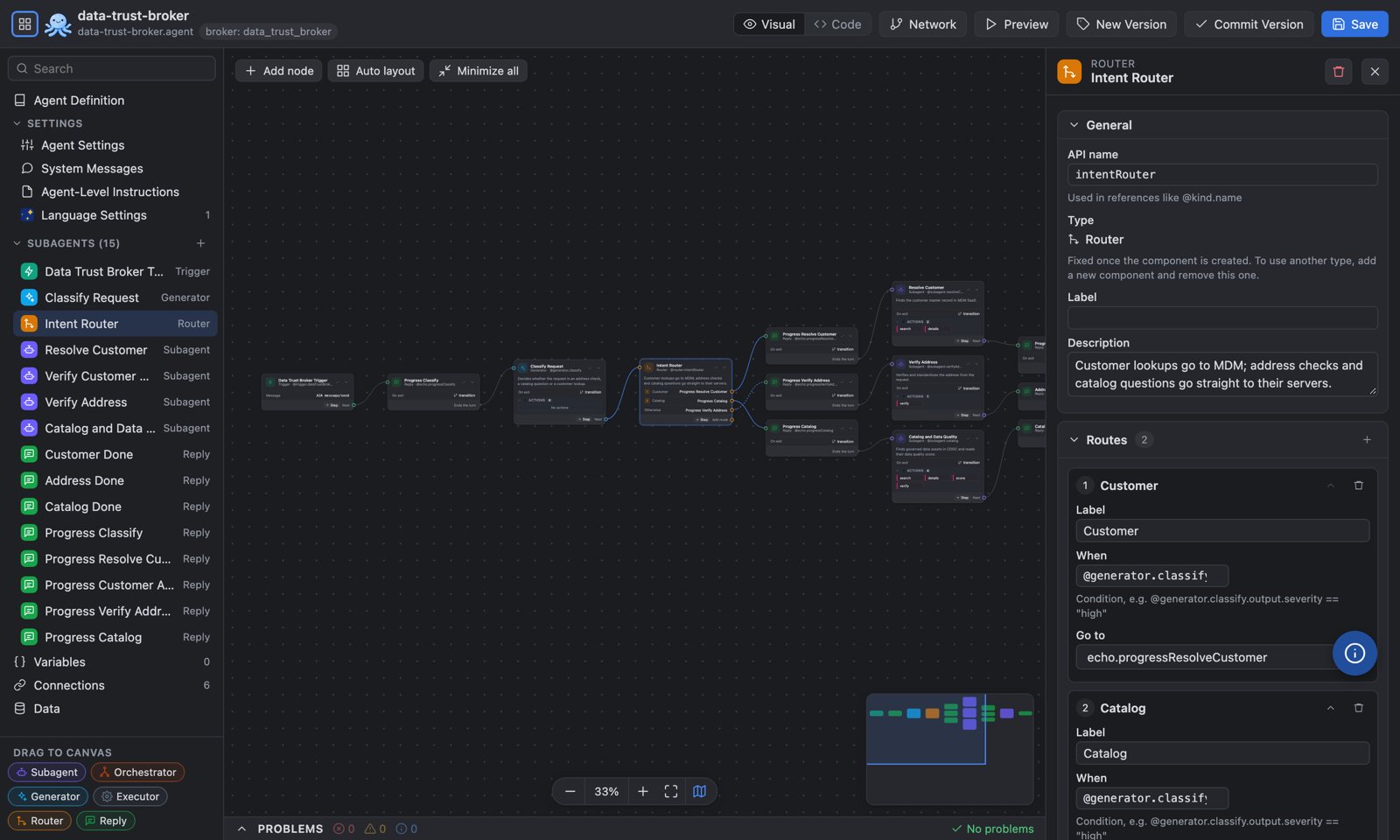
When you are done, the flow matches the template's flow (Path 2, Step 4). The built-in done reply isn't used by this use case. The Problems bar shows echo done is not reachable from the trigger as a warning, and you can leave it.
Step 3.8. Validate, deploy and chat
Run Validate from the canvas CLI menu and fix anything in the Problems bar. Then follow Path 2 from Validate and build onwards: deploy (enter the secrets), wait for the green light, open the chat and send the same prompts. Your network answers like the template, because it is the same network, built by hand.
What you learned
- How a deterministic network is built: an AgentScript flow decides every step; the LLM extracts and writes text.
- How the canvas, the inspector and the code view edit the same YAML.
- How to build the same network from a blank project with forms and menus only (Path 3).
- How to validate, build, deploy, chat and trace with Octoloom.
Next
Generated from the v2-idmc-data-trust template (Octoloom media/templates/v2-idmc-data-trust). Screenshots use fake data.