
Octoloom for Agent Fabric
Design, govern, deploy and observe MuleSoft Agent Fabric agent networks, visually, in VS Code.
Get it on the Marketplace Getting started Tutorials
Version 0.9.27
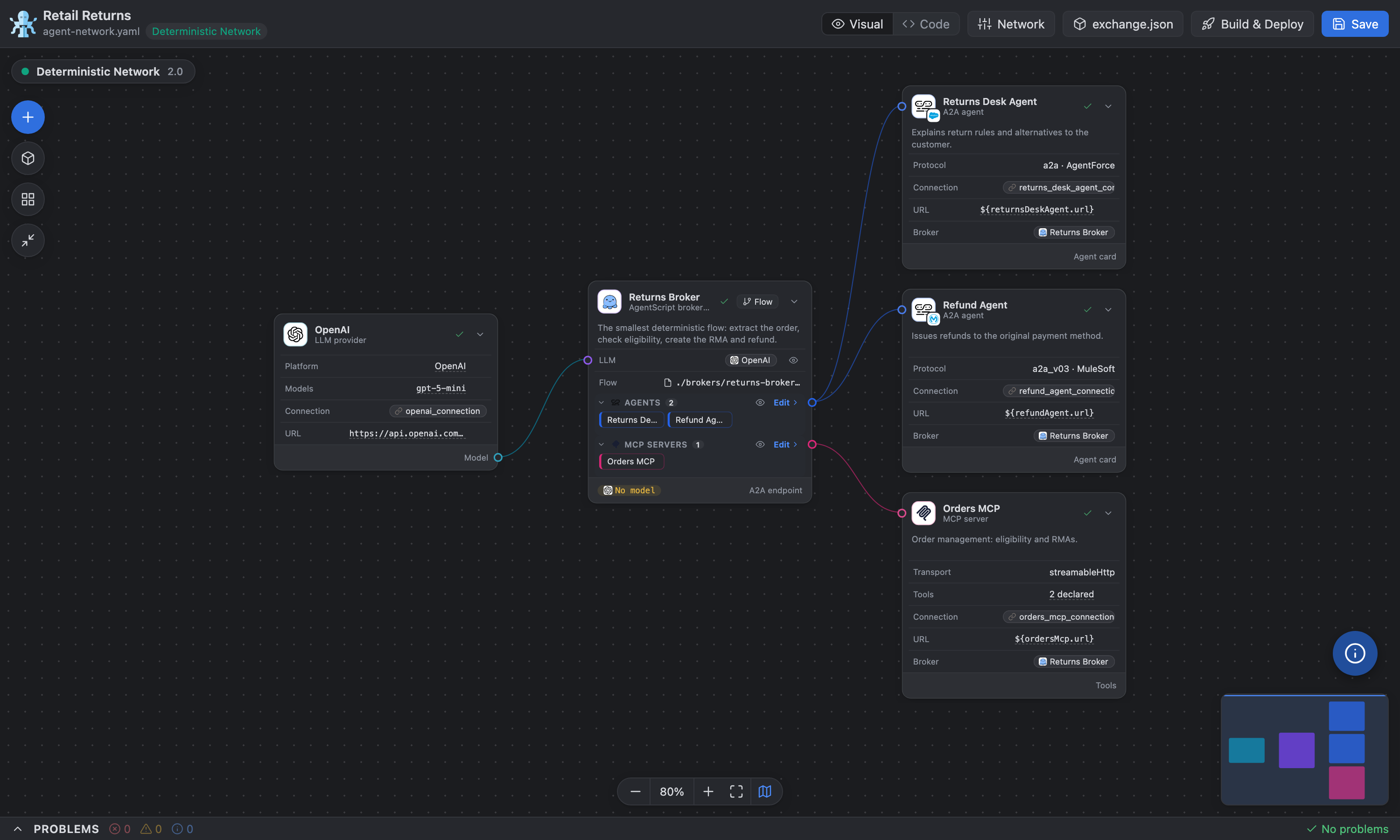
Octoloom is a visual editor for Agent Fabric network projects (agent-network.yaml, brokers/*.agent, exchange.json). Meet Loomi, the Octoloom octopus: each of his arms stands for one asset, A2A agents from any framework, MCP servers and LLM providers. The loom is where you weave them into a network that a broker orchestrates.
You can still open the YAML; Octoloom keeps it valid while you work on a canvas.
Where to start
-
A 20-minute tour: install, connect, create a project from a template, deploy and chat.
-
One per template (43), each with three paths: Just use it, Learn step by step and Build it from scratch.
-
Ready-to-run agent networks: use cases, governed, secured, fully mocked and Informatica IDMC.
-
Every view of Octoloom, what it does and how to use it, with screenshots.
-
Every button, card, canvas and panel: what it is, when to use it, examples. The same texts as the in-app Explain button.
-
Skills that teach Claude Code, Cursor and others to build agent networks the way the templates are built.
Highlights
-
Two network canvases
Probabilistic (v1, LLM-routed brokers) and Deterministic (v2, AgentScript brokers). Octoloom detects the version from the file. - Welcome page
When VS Code starts, Octoloom opens a Welcome page. It has cards to start a Probabilistic or Deterministic network and the 5 agent network projects built last on this machine. It also shows local statistics: workspaces, projects and the v1 / v2 ratio, brokers, agents, MCP servers, Exchange and A²D assets, policies, deployments, publishes and the top 3 LLM providers. - Coverage map
One tab with every agent network on this machine: policy coverage by category, protected brokers, upstream authentication, governance results, real services vs A²D mocks and deploy status, plus a chart of where every agent, MCP server, LLM, policy and ruleset comes from (A²D, Agent Fabric, Informatica IDMC, P4A, your organization). Opens from Home → Your statistics → Coverage map. Read-only and local. - Project templates
New Project opens a dialog. Start blank or from 43 ready-to-run examples: business use cases, each with a governed variant that has built-in Agent Fabric policies, five secured variants, two Informatica IDMC networks and six fully mocked use cases (three v1, three v2) whose LLM is an A²D LLM mock too, so they run without an OpenAI key. All other upstreams are public A²D mocks. - Tutorials
Getting started: a 10-step tour of Octoloom. All template tutorials: one per template, with Just use it, Learn step by step and Build it from scratch, with screenshots. Also on the Welcome page. - Broker flow editor
Edit
.agentbroker flows as a graph: triggers, routers, orchestrators, subagents, generators, executors and replies. - Asset palette
Browse Agent Fabric (Exchange) assets and A²D prototypes side by side. Drag them onto the canvas to add them. The A²D tab also lists LLM mocks: drop one on a broker to deploy and chat without a real LLM key. - Mocks → real services
Start with A²D hosted mocks and replace them with published Agent Fabric assets later. Every card shows where it comes from. - Any agent framework
Shows the framework of each agent: Agentforce, MuleSoft, OpenAI, Anthropic, Google ADK / Vertex, Gemini, Bedrock, Azure AI Foundry, Microsoft, LangChain, Langflow, LlamaIndex, Databricks, Snowflake, ServiceNow, Atlassian. - Protocols
A2A agents (v0.3 and current), MCP servers (streamable HTTP / SSE) and LLM providers. - LLM providers
OpenAI, Gemini, Amazon Bedrock and Salesforce, with API key or OAuth 2.0 client credentials (JWT) for LLM gateways. The Omni gateway is recognised from the URL. You can change a broker's LLM provider and model on the canvas. A²D LLM mocks (OpenAI, Azure OpenAI, Bedrock OpenAI, Gemini) are added as a project LLM pointing at the mock, with a placeholder key. - Policies
Apply gateway policies to brokers and connections (v1
spec.policies, v2 inbound / outbound). Pick from the built-in Agent Fabric policies, your organization's policies in Exchange, or the P4A catalog. A P4A policy that is not yet in your org is deployed there first. Cards show the policies that are applied. - Connectivity test
Test any broker, agent, MCP server, LLM or connection from the inspector: MCP initialize and tools/list, the A2A agent card, LLM
/models. Uses the auth of the connection and theexchange.jsondefaults. MCP servers are called at the connection URL +transport.path, exactly like the runtime. - Inline editing
Change values directly on a card, for example the allowed MCP tools, the URL, the LLM platform or the broker limits. Click a card to open the full inspector. - Deployment status
Each project shows a status light: grey not deployed, green deployed and running, blue deployed behind authentication (needs credentials), red stopped or failed. Octoloom remembers where a project is deployed (environment, gateway, broker URLs) across restarts, and finds projects that were deployed earlier in API Manager. - Broker chat
Chat with a deployed broker: the Agent Network View on the left (the whole network read-only, or one reply as a sequence of calls), and a chat on the right with the skills from the agent card, the task state and the raw JSON-RPC request and response. The trace icon under a reply shows the trace of that message on the left as a waterfall. While the broker works, the chat says so in plain words and never looks stuck; v2 brokers stream their status updates live (the Live button next to Send turns it on or off). Works with A2A 0.3.0 (v1) and 1.0 (v2). Brokers behind authentication: bearer token, client credentials, OAuth 2.0 password grant, client ID, API key, Basic or user sign-in (OAuth 2.0 + PKCE). - Agent Network Tracer
See what a deployed broker did for each task: the path it took through its
.agentgraph, the tools and LLMs it called, what failed and why. Read-only, from Anypoint logs, task state and traces. Export a whole task as JSON for Splunk or Datadog. - Build, publish, deploy
Validate, publish to Exchange, deploy and undeploy through
anypoint-cli-v4. Octoloom installs the CLI and its prerequisites if they are missing. Pre-deploy checks catch what the CLI only reports after a full deploy: a missing brokerimplementationfile (stops the build), and, when Agent Fabric is connected, a dependency the org can't read, a registry key owned by another project and a connection key that is already an API instance in the environment (asks Fix and deploy, Deploy anyway or Cancel; Fix and deploy renames the taken key with every reference and.agenttarget). Anexchange.jsongroupIdstill at${organizationId}is set to the connected organization or business group before every build. Validate Project (check icon) is a dry run of build, publish and deploy on a copy of the project: it lists the repairs a build would make, the project and pre-deploy findings, the CLI build result and the deploy variables without a value, and changes nothing in your files or the org. - Share a broker
The Share icon in the broker chat header opens the Share dialog. Local portal generates a standalone web chat for a deployed broker: a Node server with no dependencies, a chat page, a Dockerfile and deploy steps. Run it here or host it anywhere; visitors sign in with a shared passcode (shown once, only its hash is stored) and the broker credentials stay on the server. A²D sessions invite people by email to chat with a deployed broker in the Octoloom chat hosted by A²D; their passed / failed / in-progress marks, comments and conversations come back into the dialog, and you can continue any conversation in your chat. - Governance
Validate a project against rulesets from Agent Fabric (MuleSoft), P4A (community and your own), your organization's Exchange and local files, with
anypoint-cli-v4 governance api validate. Only rulesets that apply to A2A Brokers, A2A agents or MCP servers are listed. Findings are marked on a read-only canvas and grouped by rule as in Anypoint API Governance, with a Fix button that applies the v1 / v2 reference change. A report covers one project or the whole workspace (overview, per-service rules and configuration). A local check only: never part of build, publish or deploy. - Minimize to icons
Shrink every card on the network canvas or broker flow to its icon (or one card at a time) to see what is orchestrated at a glance. - Explain anything
A floating info button on every Octoloom editor and panel. Click it, then click any card, panel, tool or canvas to see what it is, when to use it and examples. It also starts the guided tour of a canvas. Drag the button anywhere; every tab follows. - Light, dark or auto
One switch sets the theme for every Octoloom view.