Network canvas (agent-network.yaml)
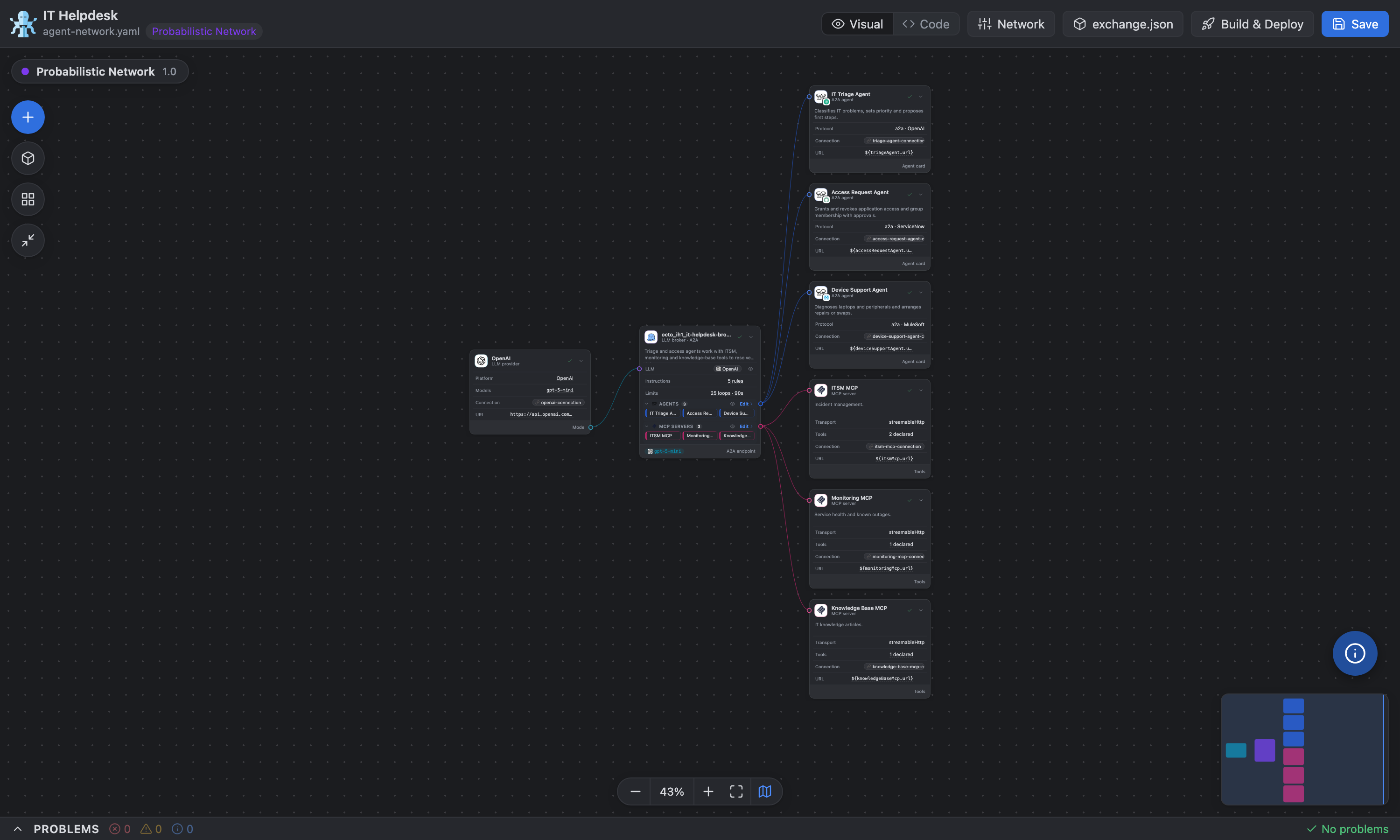
- Cards for brokers, agents, MCP servers and LLMs, with edges for the references between them. Ports sit on the exact row an edge refers to. On a v2 canvas the Context card (the
context.policiesand connections without an owner) sits left of the brokers, and an orange edge connects it to each broker's Context row. - Dashed icon tile = an external asset: an agent, MCP server or LLM referenced from Exchange (an
exchange.jsondependency) instead of declared in this project, for example MuleSoft'sopenaiLLM in the v2 templates. The dashes take the card's colour (cyan for LLMs, blue for agents, pink for MCP servers), and its Exchange settings are read-only on the card. - Add menu with templates (the + button): each component offers Empty or a ready-made entry: LLM providers (OpenAI, Azure OpenAI, Gemini, LLM through a gateway, Bedrock on v2), connections with a chosen authentication, reusable v2 policies, A2A 1.0 / 0.3.0 agents and HTTP / SSE MCP servers. Variables go into
exchange.json; secrets have no default and are asked for at deploy time. - Tool stack on the left of the canvas: + Add, Asset Palette, Auto layout and Minimize all. Hover a button to see its name.
- Inspector panel: identity, connections, interfaces (A2A card, skills), MCP tools, framework, tags, description, policies and a connectivity test. Drag its left edge to resize it.
- Inline editing: click a value with a dashed underline, or the pencil on a row, to edit it on the card. Examples: allowed MCP tools (multi-select read from Exchange or the live server), connection URL, LLM platform, broker loops and timeout.
- Allowed tools (v1): choose any number of tools of an MCP server with checkboxes. No selection means all tools are allowed.
- Deterministic brokers (v2) show the agents and MCP servers they use, grouped by section. Link adds the matching actions to the broker's
.agentflow (a2a://…/mcp://…), and the trash icon removes them. An agent or MCP server that no broker uses shows a Link to … shortcut. - Delete a component: select it and press Delete, or use the trash icon in the inspector. Its references, connection and
exchange.jsondependency are removed with it. A flow's start and Done nodes cannot be deleted. - Collapse any card, fold a section, or hide/show connected cards with the eye button (for example, hide every MCP server of a broker, or its LLM). Positions and visibility are saved for each workspace.
- Problems panel with schema validation. Click a problem to jump to the card.
- Auto layout, zoom and fit, and a minimap you can collapse or show from the toolbar.
- Switch between Visual and Code at any time. Edits go to the YAML directly, and comments and formatting are kept. See Code view.
Buttons and components
The same text as the in-app Explain button (click the floating info button, then the item).
Agent network canvas
The canvas of one agent network file: brokers, agents, MCP servers, LLMs, connections and policies as cards with edges between them. It edits the YAML, which stays the source of truth.
When to use it: Designing or reviewing a network.
Examples:
- Drag from a port to another card to connect them
- Select a card to edit it in the inspector
- Use the zoom bar, minimap and Minimize all to find your way in a large network
- Hover a button of the tool stack on the left (+ Add, Asset Palette, Auto layout, Minimize all) to see its name
- A dashed icon tile (in the card's colour) marks an external asset: an agent, MCP server or LLM referenced from Exchange (exchange.json dependency) and not declared in this project
Broker
The agent your users call. In 1.0 it is an LLM with instructions, linked agents and MCP tools. In 2.0 it is an AgentScript flow with an A2A interface.
When to use it: One per entry point. Split brokers by audience or domain.
Examples:
- Customer service front door
- Returns flow with eligibility gate
- IT helpdesk triage
- Kind and Implementation (.agent) of a 2.0 broker are in Protected broker settings, locked like the protected exchange.json defaults: click the lock icon to change them; the YAML always edits everything
- Removing a 2.0 broker asks whether to delete its .agent flow file too (it goes to the Trash; a file another broker uses is never offered)
- A 2.0 flow needs at least a trigger, one agent node (generator, subagent or orchestrator) and a reply (echo): delete anything else and the build still passes
Agent
A remote A2A agent described by its agent card (skills, URL, protocol version). Brokers call it through a connection.
When to use it: A capability already exists as an agent (Agentforce, A2D mock, custom).
Examples:
- Refund agent (A2A 1.0)
- Order status agent (A2A 0.3.0)
MCP server
A Model Context Protocol server with tools. Brokers may call only the tools you allow. Its connection URL is the server base: the runtime adds metadata.transport.path (for example /mcp).
When to use it: Deterministic system access: look up, create, update records.
Examples:
- orders_mcp: check_return_eligibility, create_rma
- crm_mcp: find_customer
- URL https://host/product-mcp/ + path /mcp → the runtime calls https://host/product-mcp/mcp (a URL ending with /mcp would call /mcp/mcp)
LLM provider
The model provider and models brokers may use. The key comes from a connection secret at deploy time. A dashed icon tile means the LLM is referenced from Exchange (an exchange.json dependency, classifier llm-metadata), not declared in this project; its Platform and Models are read-only on the card.
When to use it: Every network that has a 1.0 broker or AgentScript LLM nodes.
Examples:
- OpenAI gpt-5-mini
- Azure OpenAI deployment
- Dashed tile: MuleSoft openai from Exchange, shared by every project that references it
Connection
Where and how the gateway reaches an agent, MCP server or LLM: URL, authentication and policies.
When to use it: One per upstream. Change URLs per environment with variables.
Examples:
- ${refundAgent.url} with PII detection inbound
- openai_connection with apiKey ${openai.apiKey}
- MCP connection URL = server base without /mcp; Test connection calls exactly what the runtime calls
Inspector
The properties of the selected card or node. Edits go straight into the file.
When to use it: After selecting something on the canvas.
Examples:
- Drag its left edge to resize it; the width is kept
- Close it to give the canvas more room
Canvas tools
The zoom bar, minimap and floating buttons of a canvas: zoom, fit, auto layout, Minimize all / Open all and the map of the whole canvas.
When to use it: Finding your way in a large canvas.
Examples:
- Fit shows every card
- Click the minimap to jump there
- Minimize all turns every card into its icon
Problems
The validation findings of this file and the project checks across agent-network.yaml, exchange.json and the broker .agent files: errors, warnings and hints with the object they are about. A finding with a fix has a button that applies it as one edit: one Undo reverts every file it changed, and nothing is saved until you save. The same findings are in the VS Code Problems panel with a light bulb quick fix. When you save agent-network.yaml or a .agent file, variables it uses that exchange.json does not declare are added there (unsaved; setting agentNetwork.syncVariablesOnSave turns this off).
When to use it: Before a build or deploy; errors stop the build.
Examples:
- Click a problem to select the card it is about; in a broker flow it also opens the field the problem is about (for example Go to or Prompt)
- Collapse the bar with its chevron
- Two brokers share brokers/sales.agent: click Copy the flow to brokers/support.agent
- Variable ${crm.url} is not declared: click Add to exchange.json
- Renaming a broker offers to rename its .agent file too
- A flow path ends without a final reply: click Go to the final reply (done) to wire it (setting agentNetwork.flowCoach turns this suggestion off)
- The broker flow checks what Agent Fabric rejects at build or deploy: one trigger per interface, no transition back to the trigger, every path ending in a completed, failed, canceled or rejected reply, empty prompts, unknown LLM settings and out-of-range temperature or top_p
- Network checks: a broker card needs a description and unique skill ids; amazonSigv4 is for LLM connections only; a TLS context needs both name and group; OBJECT_STORE_DEFAULT_TTL_MS is at most 30 days
- Deleting an agent or MCP server also removes the flow actions that called it and the variables only it used, in one Undo; a message says what went with it