Policies and P4A
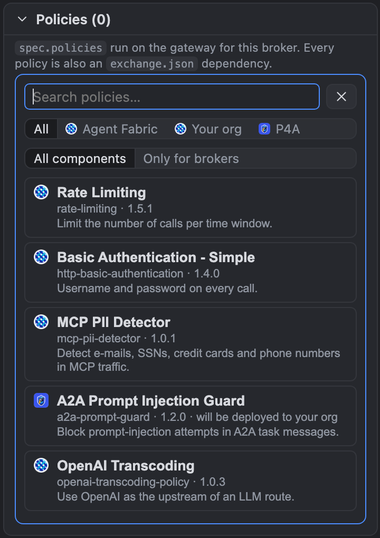
Select a broker or a connection (or an agent, MCP server or LLM, which uses its connection), then click Add policy under Policies:
- Agent Fabric: the MuleSoft-provided gateway policies that Anypoint offers on an Agent Fabric instance (about 120), for example Basic Authentication - Simple and LDAP, Client ID Enforcement, JWT Validation, IP Allowlist / Blocklist, CORS, Spike Control, Rate Limiting, Header Injection, Credential Injection, the A2A, MCP and LLM policies and OpenAI Transcoding. The list is bundled so it works offline; when you are connected, newer MuleSoft policies from Exchange are added. Mule 4-only templates and the policies the CLI adds to every connection by itself (MCP Support, Tracing, A2A Agent Card, …) are not listed.
- Your org: policies published to Exchange in your Agent Fabric organization.
- P4A: the P4A policy catalog. If the policy is not in your org yet, Octoloom asks before deploying it through the P4A MCP server, using your P4A connection and workspace, and then waits for the release.
The picker lists every policy for every component (broker, agent, MCP server or LLM). Policies from Exchange and P4A do not say reliably where they apply, so nothing is hidden. To narrow the list, switch All components to Only for brokers (or A2A agents, MCP servers, LLMs).
Each applied policy has a chevron to collapse it to its title row: the binding name, direction, policy asset and number of settings. With two or more policies they start collapsed, and Collapse all / Expand all sits in the Policies header. Octoloom remembers your choice per policy.
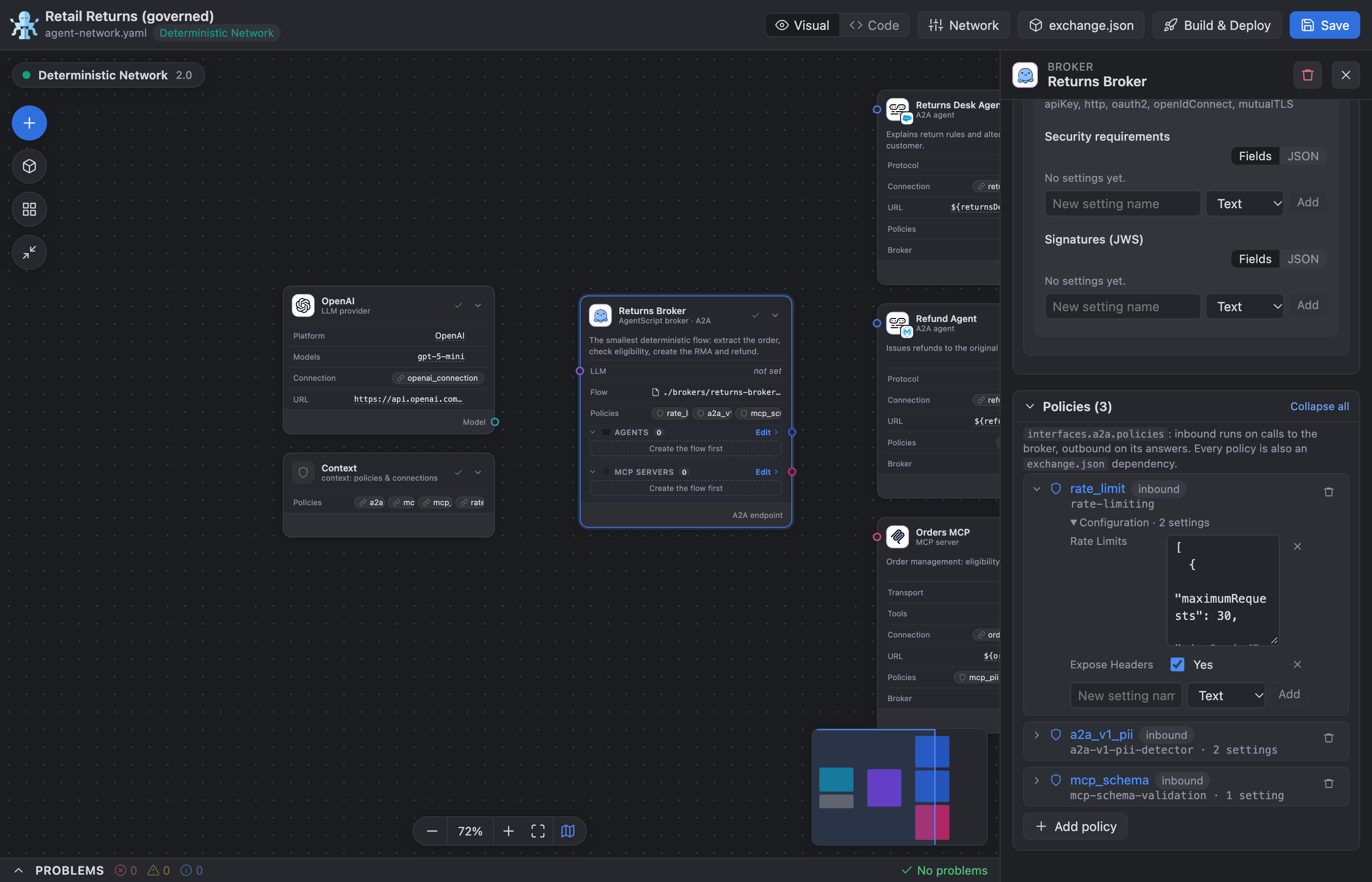
Octoloom writes the policy into the YAML (v1 spec.policies; v2 policies.inbound|outbound on a connection or interfaces.a2a.policies on a broker) and adds its exchange.json dependency (classifier schema). For custom headers next to OAuth, such as a client_id header that client ID enforcement requires, add Header Injection to the connection and edit the headers in place.
Buttons and components
The same text as the in-app Explain button (click the floating info button, then the item).
Policy
An Agent Fabric gateway policy applied to a connection or broker interface: every MuleSoft-provided policy Anypoint offers on an Agent Fabric instance (Basic Authentication, Client ID Enforcement, JWT Validation, IP Allowlist, CORS, rate limiting, PII detection, header injection, schema validation, prompt decoration, …), your organization's own policies and P4A policies.
When to use it: Governance: protect upstreams, mask personal data, add headers, enforce limits. Add policy lists every policy for every component; switch to "Only for brokers" (or A2A agents, MCP servers, LLMs) to narrow it. Each applied policy collapses to its title with its chevron; with two or more they start collapsed, and Collapse all / Expand all is in the Policies header.
Examples:
- On a v2 canvas the Context card (context.policies and connections without an owner) sits left of the brokers; its orange Context port connects to each broker's Context row
- http-basic-authentication (Basic Authentication - Simple) on the broker
- rate-limiting 30 requests/min on the broker
- mcp-pii-detector "Log and mask" on an MCP connection
- a-two-a-prompt-decorator to add answer rules