Features
Every view of Octoloom, in the order you meet them. Each page ends with the buttons and components of that view, as the Explain button describes them.
- Welcome page: When VS Code starts, Octoloom opens its Welcome page next to the VS Code one. It doesn't open when you click the Octoloom icon later. You can also open it with the home button in Projects & Deploy or with **Octol…
- Coverage map: Home → Your statistics → Coverage map (or Octoloom: Coverage Map) opens one tab with every agent network on this machine (the projects Octoloom has seen on this user profile) or only the open workspace's.
- New project: from templates: New Project opens a dialog with 37 ready-made examples: 15 business use cases, each as a plain network and as a governed variant with built-in Agent Fabric policies (rate limiting, PII detection, schema valid…
- Agent network from Exchange: Continue work on an agent network that is already published in Exchange, by you on another machine or by a colleague. Click the Exchange icon next to + in Projects & Deploy, or choose From Exchange in the **+…
- Network canvas (agent-network.yaml): - Cards for brokers, agents, MCP servers and LLMs, with edges for the references between them. Ports sit on the exact row an edge refers to. On a v2 canvas the Context card (the
context.policiesand connections… - Broker LLM provider: Select a broker and choose its LLM provider and model in the inspector:
- LLM authentication: API key or OAuth 2.0 (JWT): By default an LLM connection uses an API key and the gateway adds its transcoding policy. For an LLM behind your own gateway that expects a JWT, choose OAuth 2.0 client credentials on the connection: the egress…
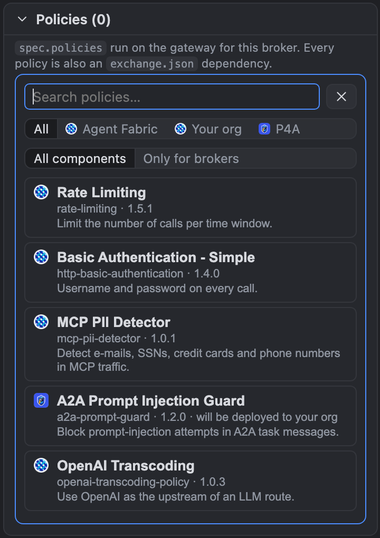
- Policies and P4A:
- Broker flow editor (brokers/*.agent): - Every subagent is a node, and transitions, routes and actions are edges. - The outline lists agent settings, system messages, instructions, language settings and all subagents. - Drag new nodes onto the canvas: Subagen…
- Code view (YAML, AgentScript, JSON): Every editor has a Code tab with a full code editor, aware of the Agent Fabric v1 and v2 reference and of AgentScript.
- Asset editor (exchange.json): A form for the Exchange descriptor: asset identity, version, variables and their defaults (secrets are masked), and dependencies.
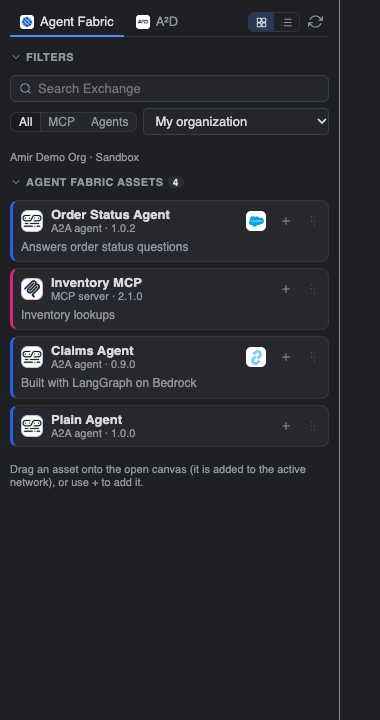
- Asset palette: Agent Fabric and A²D:
 <img src="https://raw.githubusercont…
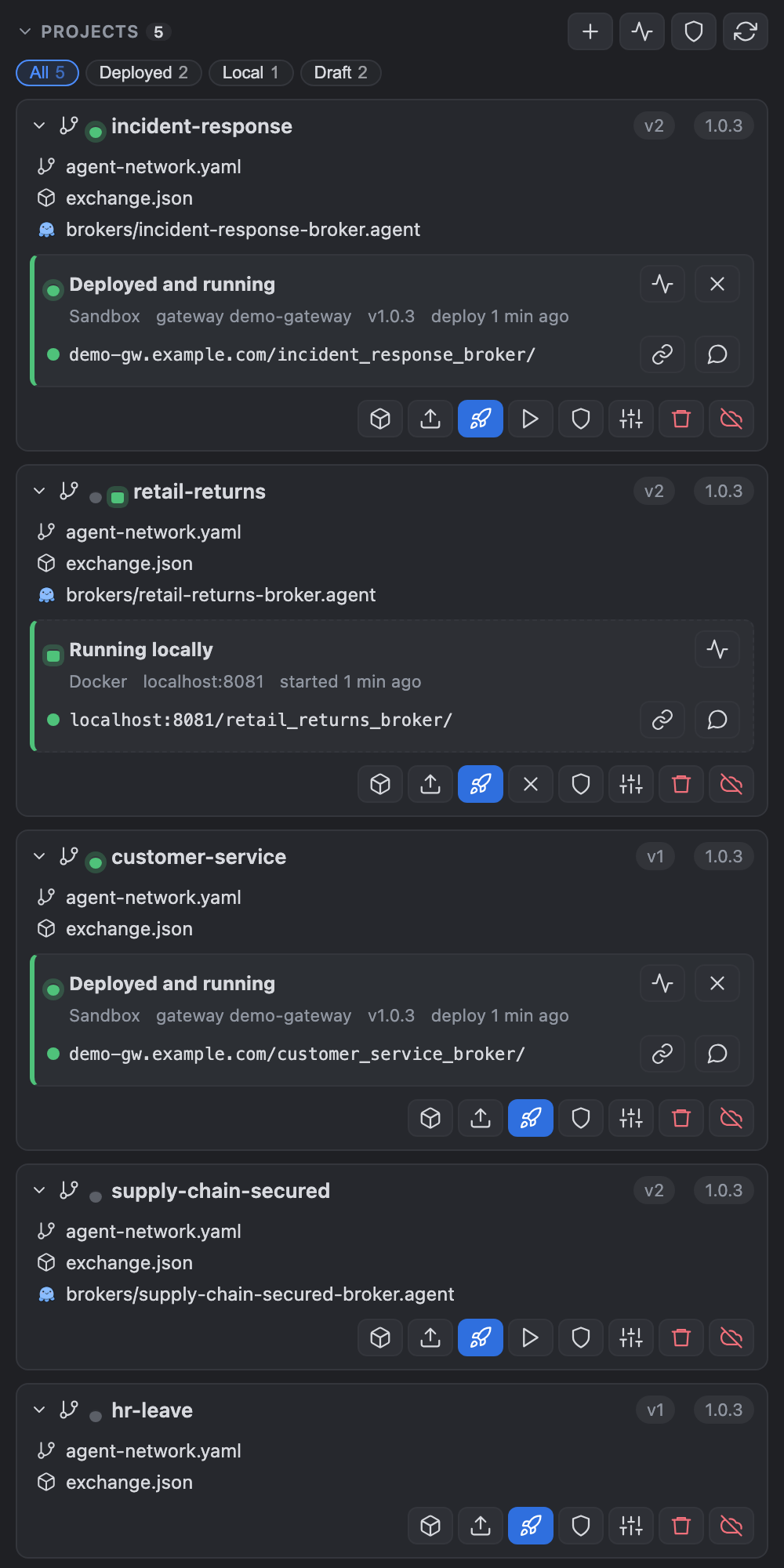
- Projects & Deploy:
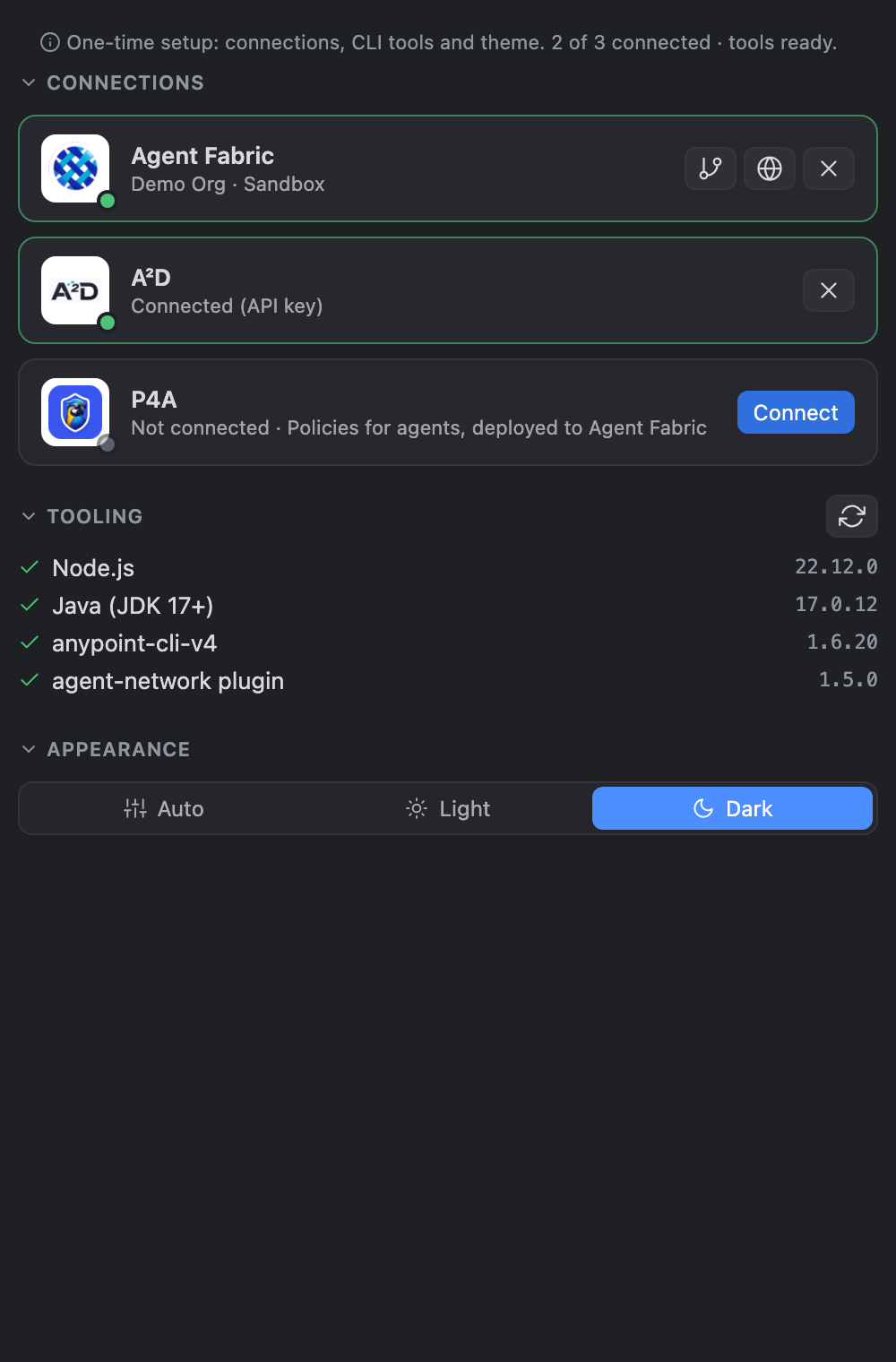
- Setup & Connect:
- Governance: rulesets for brokers, agents and MCP servers: Open it from the shield button in a project's header in Projects (after the version; one project) or in the Projects header (workspace report), or run Governance: Validate Against Rulesets.
- Minimize to icons: Toolbars stay on one row. When an editor is too narrow for the top bar (Visual / Code, Network, Build & Deploy, Save…), the button labels hide and only the icons stay, with their names as tooltips. The labels come ba…
- Explain anything: Every Octoloom editor and panel (canvases, broker flow,
exchange.json, chat, Governance, Welcome, New project) has one round, dark blue info button floating near the bottom right, above the minimap. It replaces the… - Broker chat: Click the chat icon next to a deployed broker URL in the project's deployment box, or run Chat with Deployed Broker.
- Agent Network Tracer: Click the Tracer button on a project's Deployed and running box in Projects & Deploy, or the Tracer icon under a deployed chat reply. The chat panel opens with the Tracer below the network and the chat. The **Full …