Patient Intake (demo data): secured
A clinic front desk: triage questions, insurance check and appointment booking from one conversation. Fictional patients only. Secured: authenticated connections (Basic, Client ID enforcement) with secret variables, the LLM behind a gateway URL.
| Style | Probabilistic (Agent Network 1.0) |
| Kind | Secured |
| Agents / MCP servers | 3 / 1 |
| A2A protocol | 0.3.0 |
| Policies | rate-limiting |
| Asset prefix | octo_pi1s |
| Tutorial | Patient Intake (demo data): secured: tutorial |
| Files | templates/v1-patient-intake-secured |
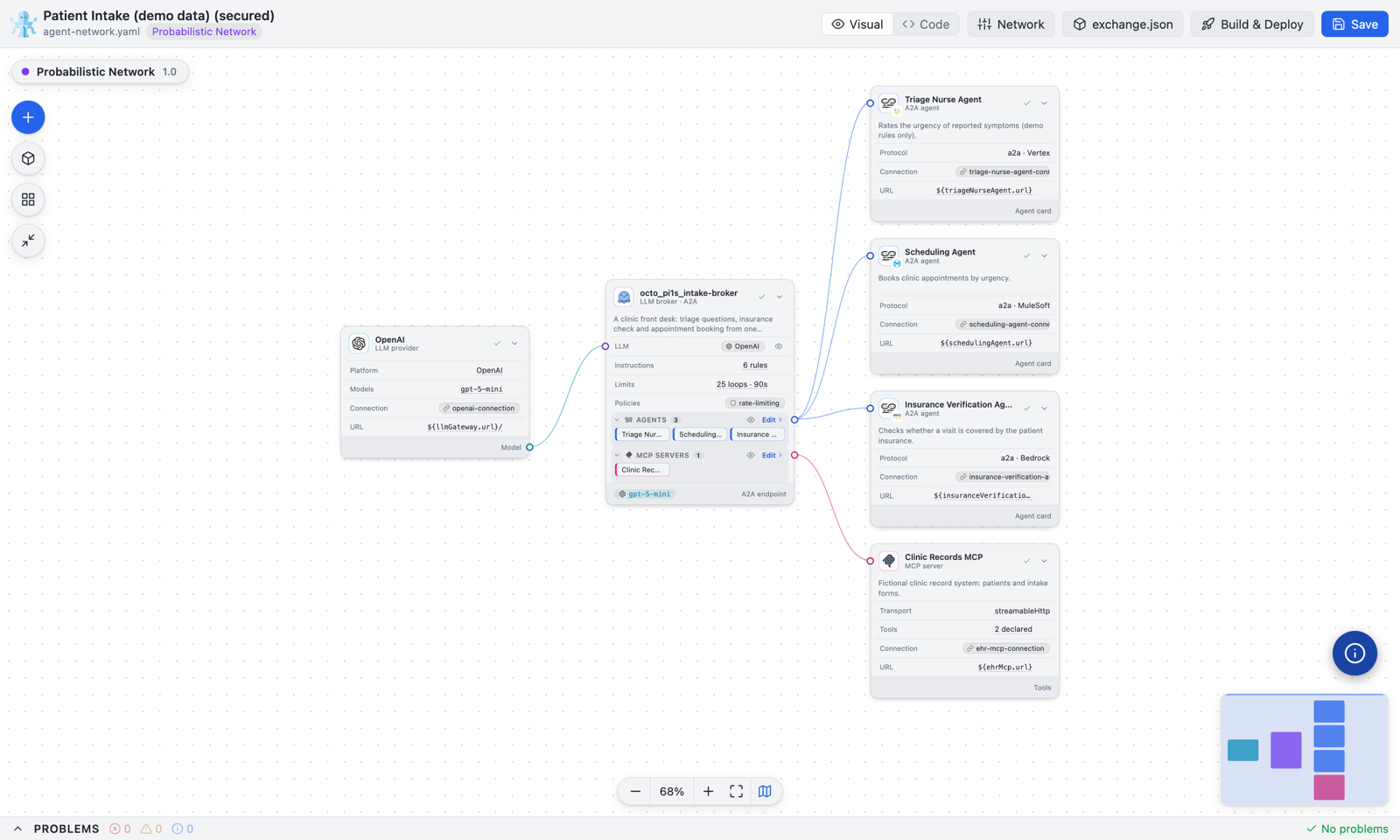 The network canvas
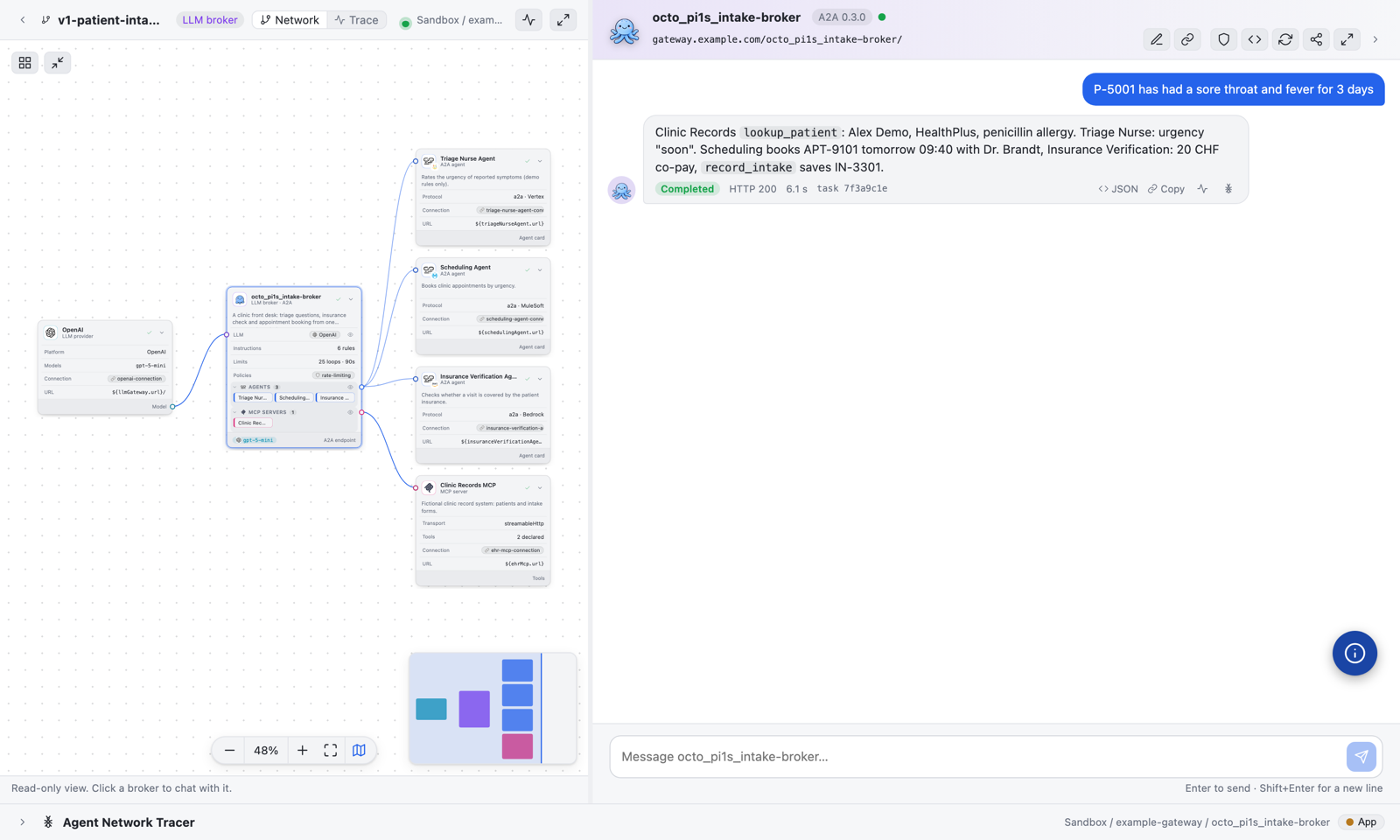 Chat with the deployed broker
A clinic front desk: triage questions, insurance check and appointment booking from one conversation. Fictional patients only.
- Style: Probabilistic (Agent Network 1.0): the LLM broker picks agents and tools from its instructions.
- Agents: Triage Nurse Agent (A2A 0.3.0, Vertex), Scheduling Agent (A2A 0.3.0, MuleSoft), Insurance Verification Agent (A2A 0.3.0, Bedrock)
- MCP servers: Clinic Records MCP (lookup_patient, record_intake)
- Secured: every agent and MCP connection authenticates (Basic or Client ID enforcement, alternating). User names and client ids are variables, passwords and client secrets are secret variables asked for at deploy time. The LLM URL is the variable
llmGateway.url(api.openai.com by default, or your LLM gateway). Policies: rate-limiting.
All agents and MCP servers are public A2D mocks, so the network runs without any other system. No credentials are stored in this template.
Deploy in 3 steps
- Setup & Connect: connect Agent Fabric (connected app client ID and secret, organization). A²D is not needed: the mock URLs are already the defaults in
exchange.json. - In
exchange.json, fill iningressgw.url(ingress gateway base url). In Projects & Deploy, click Deploy on this project (or Build & Deploy in the editor) and pick your gateway. Octoloom asks for each secret variable; nothing you type is stored: openai.apiKey: your OpenAI API key (required)ehrMcp.clientSecret: Client secret (any value works with the A²D mocks)triageNurseAgent.password: Password (any value works with the A²D mocks)schedulingAgent.clientSecret: Client secret (any value works with the A²D mocks)insuranceVerificationAgent.password: Password (any value works with the A²D mocks)- When the status light turns green (Deployed and running), click Open chat and paste a prompt below. The Tracer icon under a reply opens the task in the Agent Network Tracer, with each agent and tool call.
Try it
- P-5001 has had a sore throat and fever for 3 days
- You should see: Clinic Records
lookup_patient: Alex Demo, HealthPlus, penicillin allergy. Triage Nurse: urgency "soon". Scheduling books APT-9101 tomorrow 09:40 with Dr. Brandt, Insurance Verification: 20 CHF co-pay,record_intakesaves IN-3301. - Book a check-up for P-5002, insurance HealthPlus
- You should see: Triage "routine", Scheduling books APT-9102 on 2026-11-27 14:00 with Dr. Okafor. The record says Sam Example is insured with CareOne (no co-pay), so the broker may point out the mismatch.
- P-5001 has chest pain right now
- You should see: Triage Nurse: "emergency". The broker stops and tells the patient to call emergency services; no appointment is booked.
- P-5001 has had a sore throat and fever for 3 days
- You should see: Same answer as the plain variant: the A²D mocks accept any credentials. The Tracer shows each authenticated upstream call.
The broker is probabilistic: the LLM picks the agents and tools, so the wording and the order of the calls can change between runs. The ids and numbers come from the mocks and stay the same.